
Microsoft Ignite 2026: What’s New in Copilot, Agent 365, Foundry, and AI Security
Introduction
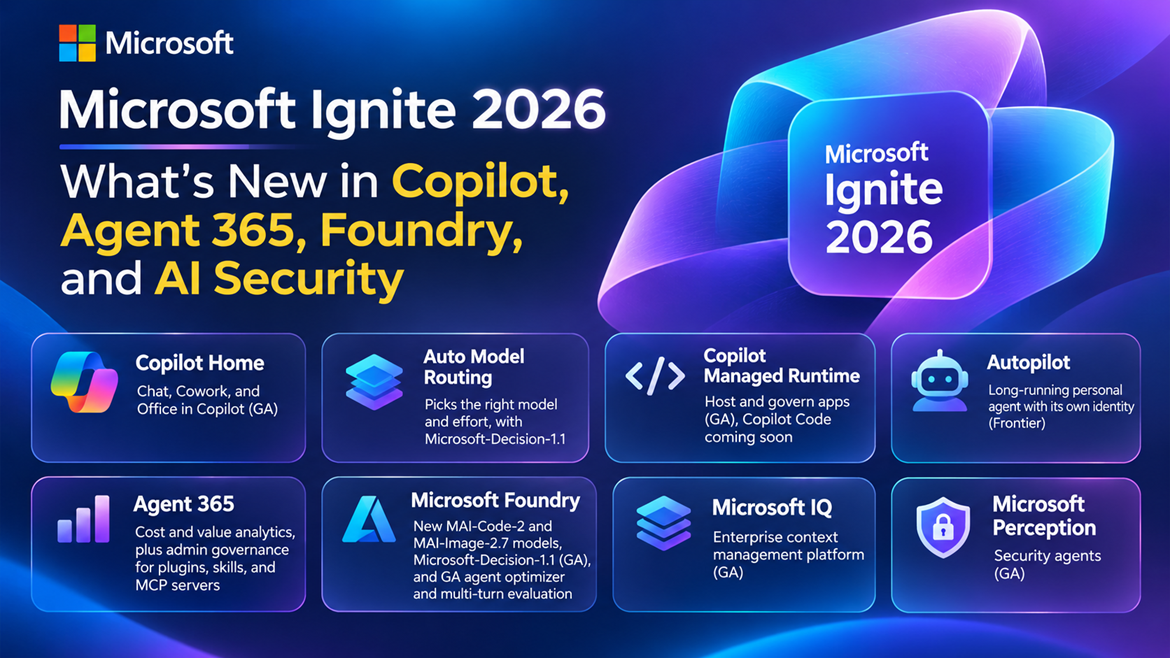
Microsoft Ignite 2026 marks another important milestone in Microsoft’s journey toward an AI-powered workplace. This year’s announcements focus on moving beyond traditional AI assistants toward intelligent agents that can plan, execute, and manage complex tasks with minimal human intervention.
Microsoft is bringing together Microsoft 365 Copilot, Copilot Cowork, Copilot Code, Agent 365, Microsoft Foundry, and AI-powered security into a more connected ecosystem.
The announcements highlight several important developments, including the general availability of Copilot Home, intelligent model routing, managed agent runtimes, long-running autonomous agents, improved agent governance, and new AI models.
For developers, IT administrators, architects, and business users, these updates introduce new opportunities to build, deploy, and govern AI-powered solutions.
In this article, we explore the major announcements from Microsoft Ignite 2026, explain their capabilities in simple terms, and discuss practical use cases.
1. Microsoft 365 Copilot Home Is Generally Available
One of the major announcements is the general availability (GA) of Copilot Home, providing a unified experience for working with AI.
Previously, users interacted with different Copilot capabilities through separate experiences. Copilot Home brings these capabilities closer together.
What’s new?
- Unified Copilot experience: Access Copilot Chat and Copilot Cowork from a common workspace.
- Office in Copilot: Now generally available, bringing document, spreadsheet, and presentation work into the Copilot experience.
- Simplified navigation: Users can move between conversational assistance and task execution more easily.
- Connected workflows: Users can start with a question and continue into a more complex task without switching between multiple tools.
Practical example
Imagine a project manager preparing for a monthly project review. They can ask Copilot:
Summarize the progress of Project Alpha, identify outstanding risks, and prepare a presentation for the leadership team.
Copilot Chat can help gather and summarize information, while Cowork can support the execution of a more complex, multi-step workflow.
Why it matters: Copilot is evolving from a conversational assistant into a workspace where users can both ask questions and get work done.
2. Intelligent Model Selection with Auto Model Routing
Different AI tasks require different levels of reasoning and computational power. Summarizing an email may require a lightweight model, while analyzing a complex business problem may benefit from advanced reasoning.
Microsoft is introducing Auto model routing, which automatically selects an appropriate model and reasoning effort based on the task.
How it works
Instead of requiring users to manually select an AI model, Copilot can determine the appropriate approach.
| Task | How Auto routing can help |
|---|---|
| Summarize an email | Select a model suitable for straightforward summarization |
| Analyze financial data | Use stronger reasoning when needed |
| Create a project plan | Apply reasoning appropriate for multi-step planning |
| Answer a simple question | Avoid unnecessary computational effort |
| Execute a complex workflow | Select an approach suited to task complexity |
Microsoft-Decision-1.1
Copilot Cowork’s Auto experience uses the new Microsoft-Decision-1.1 model.
This model is designed to support decision-making and orchestration, helping the system determine how to approach tasks and coordinate execution.
Model routing is not simply about selecting the most powerful model every time. It is about selecting the right model and effort for the work being performed.
Why it matters: Users can focus on their tasks rather than worrying about which model to choose. Organizations may also benefit from more efficient use of AI resources.
3. Copilot Managed Runtime Is Generally Available
As organizations develop more AI-powered applications and agents, managing their execution becomes increasingly important.
Microsoft announced the general availability of Copilot Managed Runtime, which provides a managed environment for hosting and governing applications created with Copilot capabilities.
Key capabilities
Copilot Managed Runtime provides an execution and governance foundation for applications built using:
- Copilot Code
- Copilot Cowork
- Copilot Studio
It helps organizations manage how these applications run within an enterprise environment. Rather than treating every AI-powered application as a completely separate deployment, the managed runtime provides a more consistent foundation for execution and governance.
Copilot Code
Microsoft also announced that Copilot Code is expected to become generally available in the coming weeks. Copilot Code extends the Copilot ecosystem toward application creation and development workflows.
Practical example
Consider an organization building an AI-powered employee onboarding solution. The solution might collect onboarding requirements, coordinate tasks, prepare documents, and guide employees through different steps.
Copilot Managed Runtime provides a managed foundation for running and governing the resulting application.
Why it matters: Organizations need more than AI models and prompts. They also need reliable environments for running and managing AI-powered applications at scale.
4. Microsoft Autopilot: Long-Running Personal AI Agents
One of the most interesting announcements is Microsoft Autopilot, a long-running personal agent that can operate with its own identity.
Autopilot is rolling out to customers participating in Microsoft’s Frontier program.
What makes Autopilot different?
Traditional AI assistants usually respond to individual requests. Long-running agents are designed to support work that extends beyond a single interaction.
- Long-running execution: Supports tasks that require multiple steps over an extended period.
- Agent identity: Operates with its own identity rather than simply being treated as a user conversation.
- Task continuity: Supports work that may require continued execution and coordination.
- Greater autonomy: Can carry out delegated tasks within configured permissions and controls.
Practical example
Imagine asking an agent:
Monitor the progress of our SharePoint migration project, identify outstanding activities, and prepare a weekly status report.
A long-running agent could potentially coordinate information gathering, analyze progress, and prepare reports as part of an ongoing workflow, provided the required data sources, tools, and permissions are configured.
This is an illustrative scenario rather than a claim that every such integration is available out of the box.
Why it matters: Autopilot represents a shift from AI that responds to individual prompts toward AI that can support delegated, ongoing work.
5. Microsoft Agent 365: Governance, Cost Management, and Business Value
As organizations deploy hundreds or thousands of AI agents, they face several challenges: How many agents are running? Who owns them? What tools can they access? How much do they cost? Are they delivering business value?
Microsoft is expanding Agent 365 to help organizations answer these questions.
Agent 365 Cost Management
Agent 365 Cost Management provides centralized visibility into usage-based AI services through the Microsoft 365 admin center.
Supported services include Copilot Cowork, Copilot Code, Copilot Studio, GitHub Copilot CLI, Autopilot, Copilot Managed Runtime, and Work IQ APIs.
Administrators can use cost-management capabilities to understand spending, establish controls, and improve financial oversight.
Agent 365 Business Analytics
Available through the Frontier program, Business Analytics helps organizations measure the value of their AI investments.
| Metric | Purpose |
|---|---|
| AI spending | Understand costs across agents, services, models, and users |
| Task success rate | Measure how successfully agents complete tasks |
| User satisfaction | Understand the quality of AI assistance |
| Assisted hours | Estimate time supported by AI |
| Cost forecasting | Plan future AI spending |
| Return on investment | Compare business outcomes with AI costs |
For example, an organization might deploy an HR agent to answer employee questions. Business Analytics can help leaders understand the agent’s operating cost, usage, and effectiveness.
Centralized governance for plugins, skills, and MCP servers
- Plugins and skills governance (GA): Administrators can control availability and assign access to users and groups.
- MCP server governance (Preview): Expanded visibility and controls for MCP servers connected through Azure AI Gateway and third-party gateways such as LiteLLM.
- Agent Map classification (Preview): Helps identify agents performing similar business tasks.
- Agent action center (Private preview planned for December): Helps administrators identify inactive or ownerless agents.
- Local and shadow agent governance (Preview): Improves visibility into agents and MCP tools that may otherwise operate outside standard management processes.
These capabilities are particularly important because an agent’s security depends not only on the agent itself but also on the tools and systems it can access.
Why it matters: Agent 365 is evolving into a centralized management and governance layer for enterprise AI, bringing together visibility, security, cost management, and business value.
6. Microsoft Foundry: New AI Models and Agent Optimization
Microsoft Foundry continues to evolve as Microsoft’s platform for building and operating AI applications and agents.
At Ignite 2026, Microsoft announced new models and additional capabilities for improving agent quality.
New Microsoft AI models
| Model | Purpose | Availability |
|---|---|---|
| MAI-Code-2 | Advanced agentic coding | GA in GitHub |
| MAI-Code-2-Flash | High-volume, everyday coding | GA in GitHub; private preview in Foundry |
| MAI-Image-2.7 | Image generation and editing | Preview |
| MAI-Image-2.7-Flash | Faster image-generation workloads | Preview |
| Microsoft-Decision-1.1 | Decision-making, routing, and verification | GA |
| MAI-Cyber-2-Flash | Cybersecurity-focused AI tasks | Announced |
These models serve different purposes rather than attempting to solve every problem using one general-purpose model.
For example, developers might select MAI-Code-2 for complex coding tasks, while Microsoft-Decision-1.1 can support orchestration and decision-oriented workflows.
Microsoft also highlighted expanded model choice in Foundry, including models from multiple providers and open-source communities.
Agent Optimizer is generally available
Building an AI agent is only the first step. Developers also need to evaluate and improve how it performs.
Agent Optimizer, now generally available, helps developers improve agent behavior using evaluation results and insights.
A typical improvement cycle looks like this:
- Build an agent in Microsoft Foundry.
- Test it against representative business scenarios.
- Identify weaknesses in its responses or execution.
- Use optimization capabilities to improve its behavior.
- Evaluate the updated agent before production deployment.
Multi-turn evaluation is generally available
Traditional evaluations often focus on a single question and answer. However, real-world agents frequently work through multiple interactions.
Multi-turn evaluation helps assess agent behavior across conversations that involve follow-up questions, changing requirements, and contextual information.
For example, consider an IT support agent:
User: My Microsoft Teams application is not opening.
Agent: Are you using the desktop or web application?
User: Desktop, and I already tried restarting it.
A multi-turn evaluation can assess whether the agent remembers the previous troubleshooting information and provides an appropriate next step.
Why it matters: Microsoft Foundry is focusing not only on creating AI agents but also on measuring, optimizing, and improving their reliability before and after deployment.
7. Microsoft IQ Is Generally Available
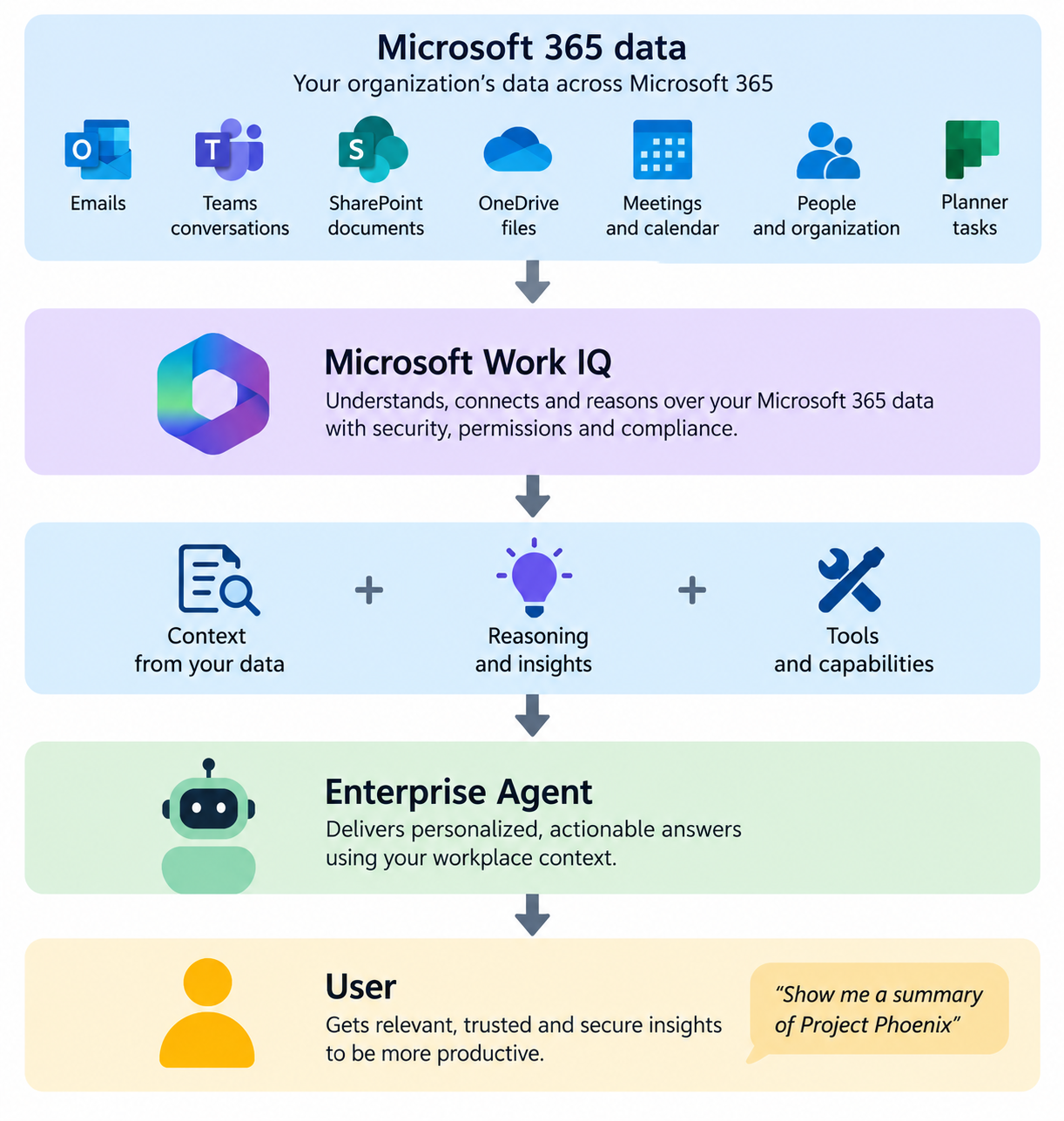
Another important announcement is the general availability of Microsoft IQ, an enterprise context management platform.
AI models have general knowledge, but they do not automatically understand an organization’s processes, policies, terminology, or business relationships.
Microsoft IQ helps connect AI applications and agents to that organizational knowledge.
Understanding the Microsoft IQ ecosystem
Microsoft IQ brings together several complementary context capabilities.
| Component | What it provides |
|---|---|
| Work IQ | Context about people’s work and collaboration |
| Fabric IQ | Business data, metrics, and operational meaning |
| Foundry IQ | Knowledge from unstructured enterprise content |
| Web IQ | External and real-world information |
| Microsoft Foundry | Evaluation and continuous improvement |
Together, these capabilities help agents understand not only the information available to them but also how that information relates to business operations.
Reusable business knowledge
Microsoft IQ also supports reusable building blocks such as skills, tools, agents, and plugins.
New business plugins, available through the Frontier program, allow organizations to package business-specific guidance and expertise for reuse.
For example, an organization could establish common guidance for handling customer complaints. Different customer service agents could then reuse that guidance while applying their own scenario-specific instructions.
Practical use case: SharePoint knowledge agent
Imagine an organization building an agent that answers questions about internal policies.
The agent could use organizational content from SharePoint, combine it with relevant business context, and apply reusable instructions to generate consistent answers.
Instead of building separate knowledge-management logic for every agent, developers can reuse supported context capabilities.
Microsoft states that Microsoft IQ is built on existing products and does not introduce a separate new subscription or SKU. However, underlying product licensing and consumption requirements still apply.
Why it matters: Microsoft IQ provides a foundation for AI agents that understand enterprise context rather than relying exclusively on general model knowledge.
8. Microsoft Perception: AI-Powered Security Agents
As AI agents become more autonomous, organizations must also strengthen their security operations.
Microsoft announced the general availability of Microsoft Perception, previously known as Project Perception.
Microsoft Perception brings together specialized security agents and coordinated workflows to help security teams investigate threats, detect vulnerabilities, and prioritize remediation.
Three types of security agents
- Red team agents: Identify potential weaknesses from an attacker’s perspective and help validate security exposure.
- Blue team agents: Investigate incidents, triage alerts, detect threats, and support security response.
- Green team agents: Prioritize security weaknesses and help determine where remediation efforts should focus.
Key capabilities
- Automated alert triage: Microsoft’s Triage Agent now covers approximately 80% of alerts in a typical Microsoft Defender queue.
- Cross-platform investigations: Security agents can investigate supported Microsoft and third-party environments, including AWS and Okta.
- Detection recommendations: AI-powered playbooks can generate and test Kusto Query Language (KQL) detection recommendations.
- Vulnerability discovery: Specialized agents help identify and validate potential security weaknesses.
- Coordinated response: Playbooks orchestrate multiple agents to support broader security operations.
Practical example
Suppose Microsoft Defender detects suspicious sign-in activity followed by unusual access to SharePoint documents.
A security investigation workflow could correlate identity and endpoint signals, examine related activity, and recommend prioritized response actions.
Security administrators would then review the findings and take appropriate action within their configured approval and security controls.
Why it matters: Microsoft Perception helps security teams move from manually investigating every individual alert toward coordinated, AI-assisted security operations.
9. What These Announcements Mean for Organizations
The Ignite 2026 announcements show that Microsoft is building a connected ecosystem for enterprise AI. Each platform addresses a different part of the AI lifecycle.
| Platform | Primary role |
|---|---|
| Microsoft 365 Copilot | Help employees complete everyday work |
| Copilot Cowork | Execute complex, multi-step tasks |
| Copilot Code | Build applications using natural language |
| Copilot Managed Runtime | Host and govern AI-powered applications |
| Microsoft Autopilot | Support persistent, long-running personal work |
| Agent 365 | Manage agent security, governance, usage, and cost |
| Microsoft Foundry | Build, evaluate, and optimize AI applications and agents |
| Microsoft IQ | Provide reusable enterprise context and knowledge |
| Microsoft Perception | Support AI-powered security operations |
What should IT administrators focus on?
Administrators should begin by reviewing their existing AI environment, identifying agents without clear ownership, and defining governance policies for plugins, skills, and MCP servers.
They should also establish cost-monitoring processes and review how agent identities and permissions are managed.
What should developers focus on?
Developers should explore Microsoft Foundry’s evaluation and optimization capabilities, investigate Microsoft-Decision-1.1 for routing and classification scenarios, and understand how Copilot Managed Runtime can simplify application hosting.
Microsoft IQ also introduces opportunities to build more context-aware applications without recreating the same business knowledge across multiple agents.
What should business leaders focus on?
Business leaders should focus on measurable outcomes.
Rather than measuring AI adoption only by the number of licenses or agents deployed, organizations can begin evaluating task completion, user satisfaction, assisted hours, and operating costs.
10. Availability Summary
The following table summarizes the availability of the major announcements as of November 18, 2026.
| Announcement | Status |
|---|---|
| Copilot Home | Generally available |
| Office in Copilot | Generally available |
| Copilot Managed Runtime | Generally available |
| Copilot Code | Frontier; GA planned for December 2026 |
| Microsoft Autopilot | Rolling out through Frontier |
| Agent 365 Business Analytics | Frontier |
| Agent 365 plugins and skills governance | Generally available |
| Expanded MCP server governance | Preview |
| Microsoft-Decision-1.1 | Generally available |
| MAI-Code-2 | Generally available in GitHub |
| MAI-Image-2.7 | Preview |
| Foundry Agent Optimizer | Generally available |
| Foundry multi-turn evaluation | Generally available |
| Microsoft IQ | Generally available |
| Microsoft IQ business plugins | Frontier |
| Microsoft Perception | Generally available |
Availability may vary by tenant, region, licensing, and rollout schedule.
Summary
Microsoft Ignite 2026 highlights a significant shift in Microsoft’s AI strategy: from AI assistants that respond to prompts to AI agents that can understand business context, execute tasks, and operate within enterprise governance controls.
Copilot Home provides a unified experience for employees, while Copilot Cowork and Autopilot extend AI toward complex and ongoing work. Copilot Managed Runtime provides a foundation for hosting applications, and Agent 365 helps organizations manage the growing number of agents, their tools, and their costs.
For developers, Microsoft Foundry introduces new models, intelligent routing, and improved evaluation capabilities. Microsoft IQ strengthens enterprise context, while Microsoft Perception extends AI-driven automation into security operations.
The key takeaway is that enterprise AI is no longer only about choosing a powerful language model. It is increasingly about connecting models, agents, business knowledge, tools, security, and governance into a reliable platform.
Organizations that combine these capabilities with clear business objectives and responsible governance will be better positioned to move from AI experimentation to practical, production-ready solutions.
Leave a comment