

Build an Enterprise Agents with Microsoft 365 Work IQ APIs
Introduction
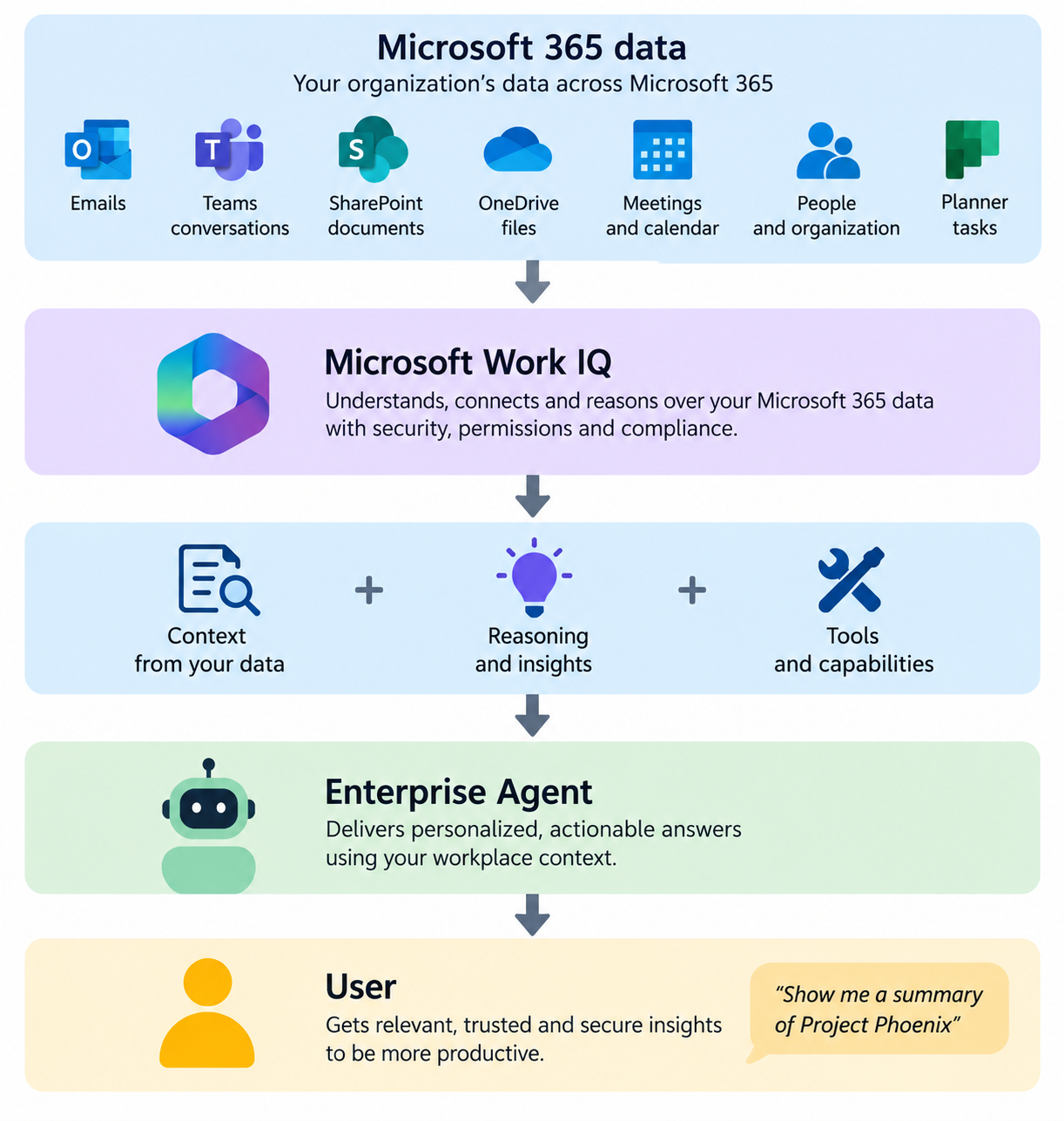
Enterprise AI becomes significantly more useful when an agent understands the work happening inside an organization, not only public information or data copied into a separate vector database, but the user’s actual Microsoft 365 context: emails, meetings, documents, Teams conversations, people, plans, and organizational knowledge.
This is the problem Microsoft Work IQ is designed to address. This article explores how to build an Enterprise Work Assistant using Work IQ, including architecture, authentication, REST API calls, multi-turn conversations, document grounding, A2A, MCP, security considerations, and production design.
What Is Microsoft Work IQ?
Work IQ is Microsoft’s workplace intelligence layer for agents and AI-powered applications. It combines Microsoft 365 data with contextual understanding so that an agent can reason over enterprise information while continuing to respect Microsoft 365 permissions, sensitivity labels, compliance policies, and governance controls.
For developers, the important part is the Work IQ API. Instead of building separate pipelines to export Microsoft 365 content, generate embeddings, maintain vector databases, synchronize changing documents, and reproduce Microsoft 365 security, an application can ask Work IQ questions directly.
For example:
What customer meetings do I have today?

Summarize the latest discussions about Project Phoenix.

What decisions were made about the Contoso migration?

Find the latest architecture document and summarize the risks.

What actions were assigned to me during this week's meetings?
Work IQ can reason across supported Microsoft 365 sources including email, meetings and calendars, OneDrive and SharePoint documents, Teams messages, people and organizational context, Planner plans, and enterprise search results. Work IQ is a workplace intelligence layer that enables agents to understand organizational data and context.
Conceptually:
The key difference is that the agent doesn’t simply retrieve raw Microsoft 365 objects. Work IQ provides an agent-oriented intelligence layer over that information.
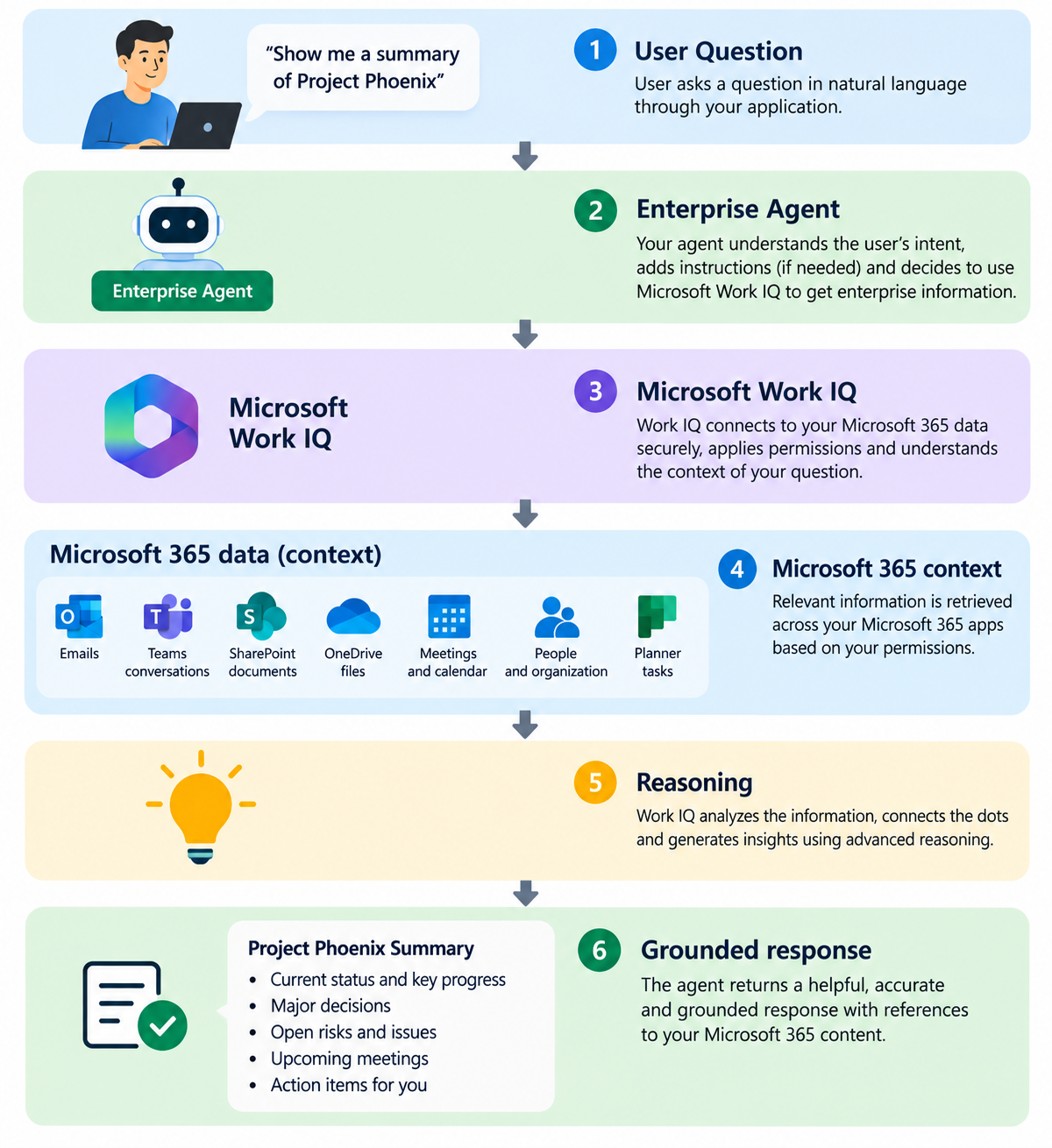
For example, consider:
What are the major risks for Project Phoenix?
Answering this might require information scattered across SharePoint architecture documents, Teams engineering discussions, Outlook customer escalations, project meetings, Planner tasks, and organizational context.
A traditional application might query each source separately and implement its own retrieval and orchestration. With Work IQ:
Why Work IQ Matters for Enterprise Agents
A typical enterprise RAG architecture often looks like:
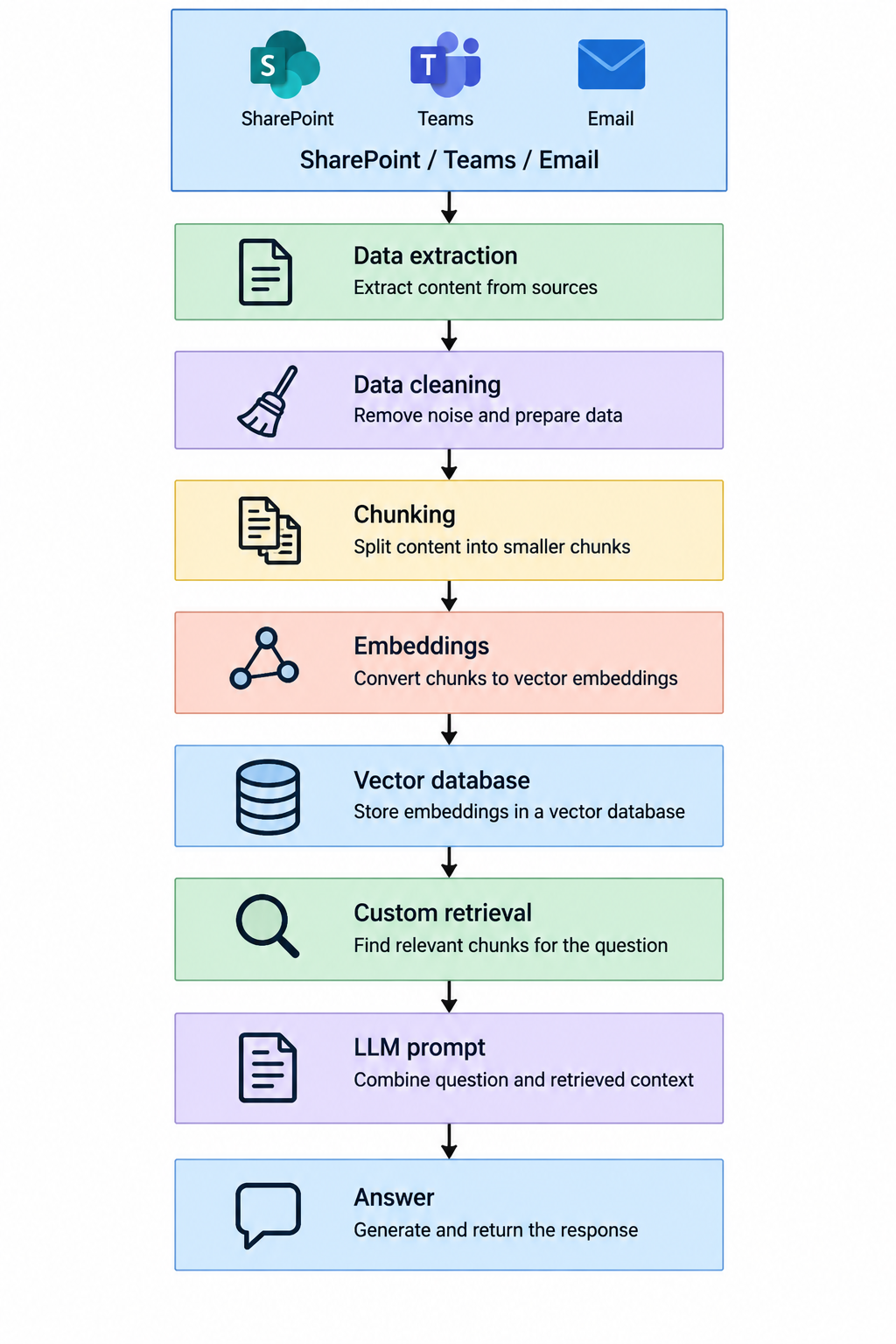
This works, but introduces challenges around synchronization, indexing, permission changes, deleted content, sensitivity, document updates, security trimming, embedding models, retrieval logic, and infrastructure.
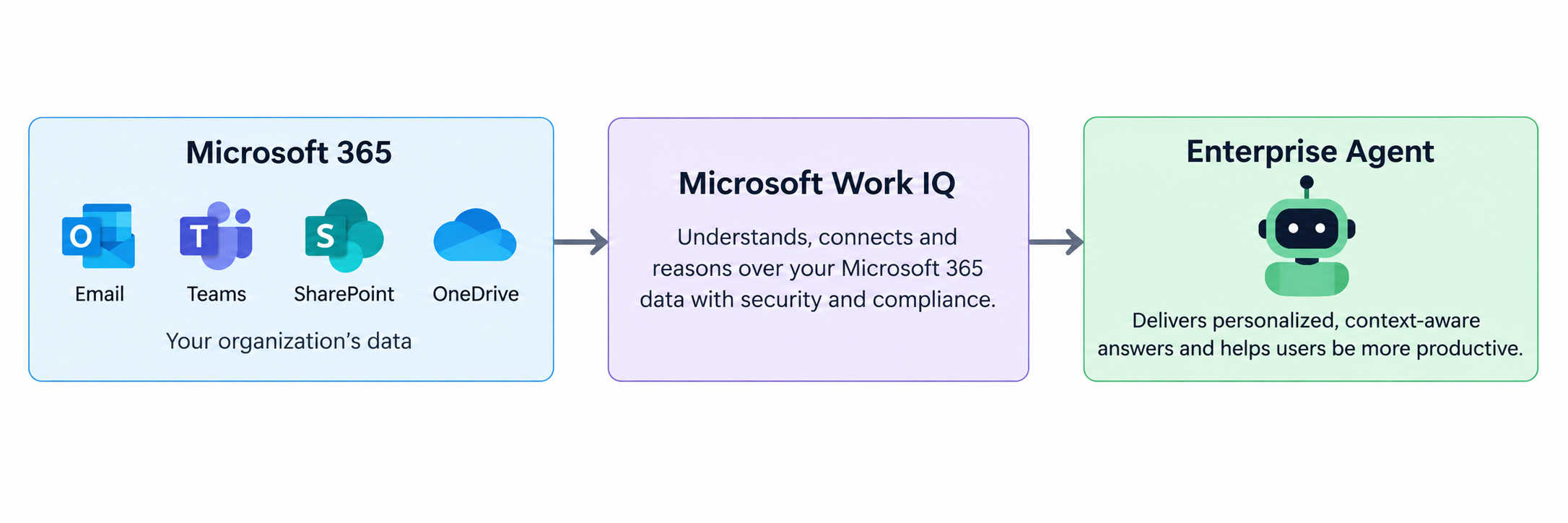
Work IQ simplifies many Microsoft 365-grounded scenarios:
What Can Work IQ Reason Over?
Work IQ supports reasoning over important Microsoft 365 workloads.
| Enterprise information | Example |
|---|---|
| Outlook messages and conversations | |
| Meetings | Calendar and meeting information |
| Documents | SharePoint and OneDrive |
| Conversations | Microsoft Teams messages |
| People | Employees and organizational context |
| Tasks | Microsoft Planner plans |
| Enterprise Search | Relevant organizational knowledge |
Example prompts:
Find the latest Project Phoenix architecture document.
Summarize the discussions about Project Phoenix during the last week.
Based on recent meetings, emails and project information, what are the major open issues for Project Phoenix?
4. Three Ways to Integrate with Work IQ
Work IQ supports three primary integration approaches:
| Protocol | Best suited for |
|---|---|
| REST | Applications and backend services |
| A2A | Agent-to-agent delegation |
| MCP | Giving AI assistants Work IQ tools |
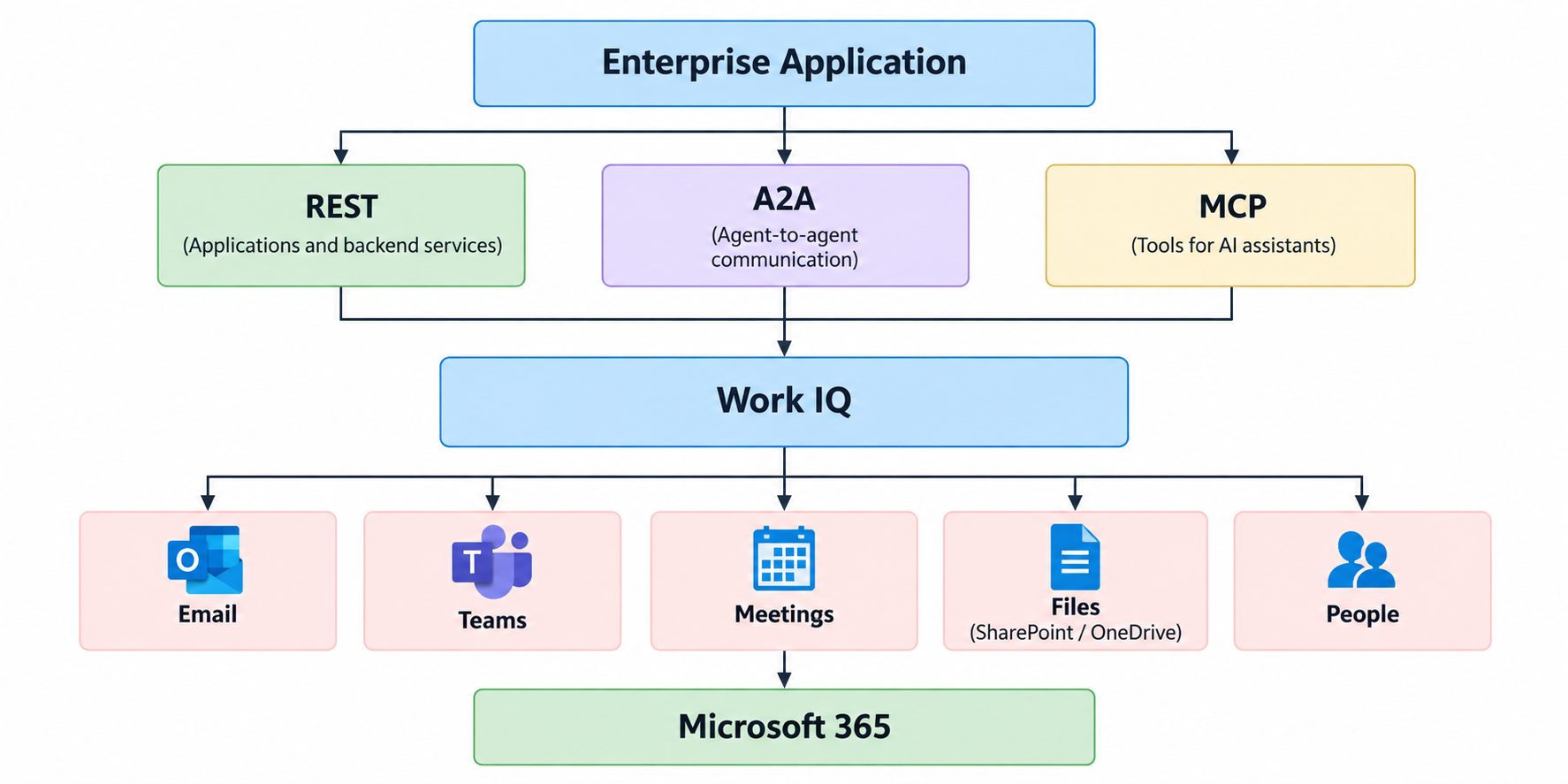
REST
Use REST for web applications, mobile applications, enterprise portals, backend services, APIs, and custom SaaS applications.
A2A
Use Agent-to-Agent communication when another agent needs to delegate enterprise research to Work IQ.
MCP
Use Model Context Protocol when an LLM-based client should dynamically use Work IQ as a tool.

Example: Enterprise Project Intelligence Agent
Our example agent is the Enterprise Project Intelligence Agent. It’s purpose is to help employees understand everything happening around their projects.
Example prompts:
What happened with Project Phoenix this week?
What customer concerns have been raised?
Summarize my meetings related to Project Phoenix.
What decisions were made?
What actions are assigned to me?
Find the latest architecture document.
Based on recent information, what should I prepare for tomorrow's steering committee meeting?
6. High-Level Architecture
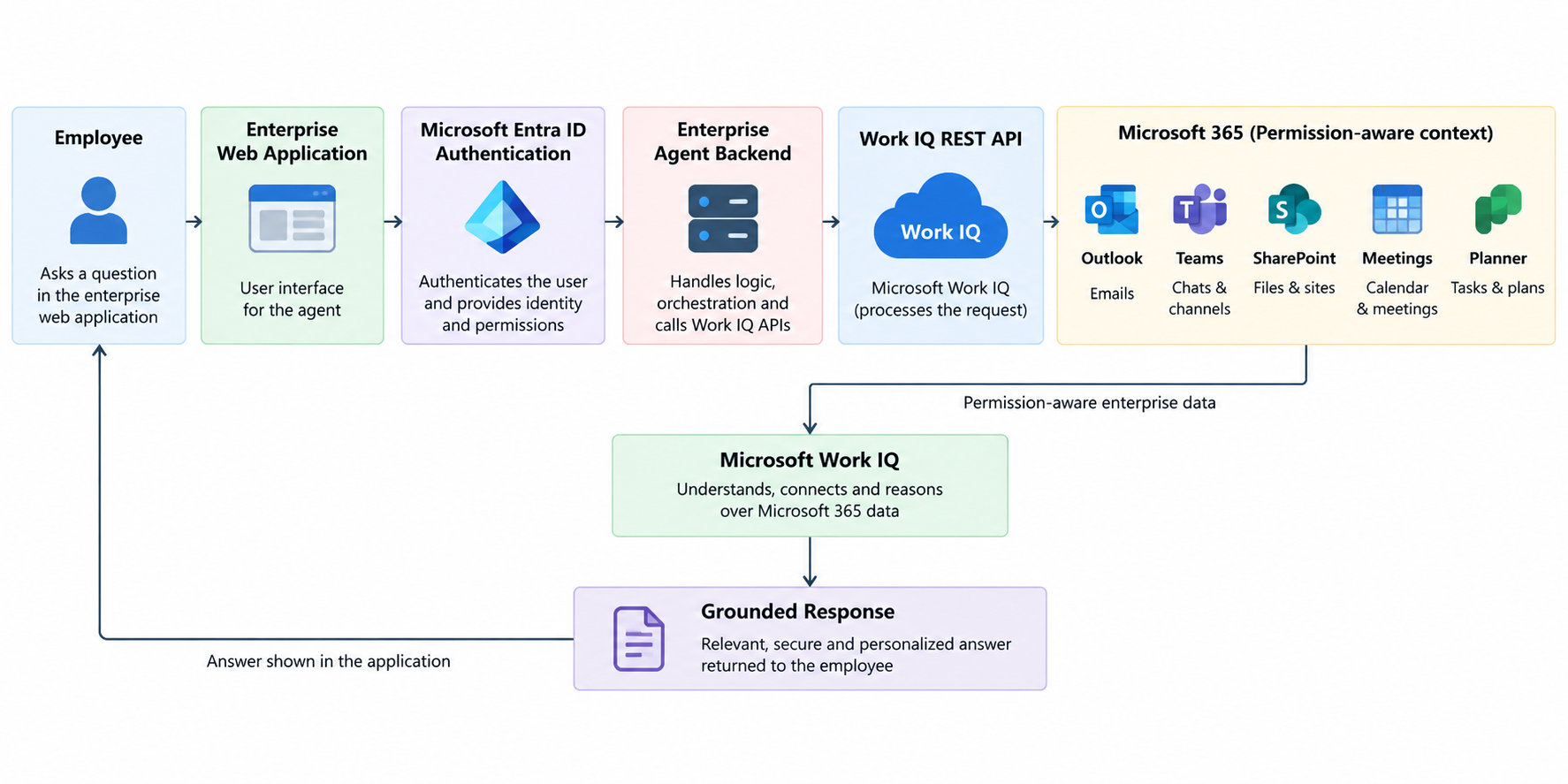
Work IQ uses delegated Microsoft Entra ID authentication. Requests execute in the context of the signed-in user.
7. Prerequisites
Before development, configure the required Work IQ tenant setup and usage-based billing according to current Microsoft documentation.
The Work IQ service application ID is:
fdcc1f02-fc51-4226-8753-f668596af7f7
Example Azure CLI provisioning:
az ad sp create --id fdcc1f02-fc51-4226-8753-f668596af7f7
8. Register the Enterprise Agent
Register the application in Microsoft Entra ID.
| Configuration | Value |
|---|---|
| Application Name | Enterprise Project Intelligence Agent |
| Authentication | Microsoft Entra ID |
| Work IQ Permission | WorkIQAgent.Ask |
| Work IQ Resource URI | api://workiq.svc.cloud.microsoft |
| Delegated Scope | api://workiq.svc.cloud.microsoft/WorkIQAgent.Ask |
9. Getting an Access Token
For Node.js, install MSAL:
npm install @azure/msal-node
Configure it:
const msal = require("@azure/msal-node");

const config = {
    auth: {
        clientId: process.env.CLIENT_ID,
        authority:
            `https://login.microsoftonline.com/${process.env.TENANT_ID}`,
        clientSecret: process.env.CLIENT_SECRET
    }
};

const cca = new msal.ConfidentialClientApplication(config);
Define the Work IQ scope:
const scopes = [
    "api://workiq.svc.cloud.microsoft/WorkIQAgent.Ask"
];
For production, use an appropriate delegated authorization flow such as authorization code or On-Behalf-Of depending on the architecture. Do not design the solution around application-only authentication.
Creating a Work IQ Conversation
Create a conversation:
POST https://workiq.svc.cloud.microsoft/rest/conversations
Authorization: Bearer ACCESS_TOKEN
Content-Type: application/json

{}
Example response:
{
  "id": "0d110e7e-2b7e-4270-a899-fd2af6fde333",
  "displayName": "",
  "status": "active",
  "turnCount": 0
}
Node.js:
async function createConversation(accessToken) {
    const response = await fetch(
        "https://workiq.svc.cloud.microsoft/rest/conversations",
        {
            method: "POST",
            headers: {
                "Authorization": `Bearer ${accessToken}`,
                "Content-Type": "application/json"
            },
            body: JSON.stringify({})
        }
    );

    if (!response.ok) {
        throw new Error(
            `Failed to create conversation: ${response.status}`
        );
    }

    return await response.json();
}
Sending the First Question
Use:
POST /rest/conversations/{conversationId}/chat
Example:
async function askWorkIQ(accessToken, conversationId, question) {
    const url =
        `https://workiq.svc.cloud.microsoft/rest/` +
        `conversations/${conversationId}/chat`;

    const body = {
        message: {
            text: question
        },
        locationHint: {
            timeZone: "Asia/Kolkata"
        }
    };

    const response = await fetch(url, {
        method: "POST",
        headers: {
            "Authorization": `Bearer ${accessToken}`,
            "Content-Type": "application/json"
        },
        body: JSON.stringify(body)
    });

    if (!response.ok) {
        const error = await response.text();
        throw new Error(
            `Work IQ error ${response.status}: ${error}`
        );
    }

    return await response.json();
}
Call it:
const result = await askWorkIQ(
    accessToken,
    conversation.id,
    "What meetings do I have today?"
);

console.log(JSON.stringify(result, null, 2));
Building Multi-Turn Conversations
Reuse the same conversation ID:
await askWorkIQ(
    accessToken,
    conversation.id,
    "What meetings do I have today?"
);

await askWorkIQ(
    accessToken,
    conversation.id,
    "Which of those meetings are related to Project Phoenix?"
);

await askWorkIQ(
    accessToken,
    conversation.id,
    "Help me prepare for the customer meeting."
);
This creates a natural multi-turn enterprise assistant experience.
Grounding the Agent with a SharePoint Document
Known SharePoint or OneDrive files can be supplied as contextual resources.
{
  "message": {
    "text": "Summarize the major risks described in this document."
  },
  "locationHint": {
    "timeZone": "Asia/Kolkata"
  },
  "contextualResources": {
    "files": [
      {
        "uri": "https://contoso.sharepoint.com/sites/ProjectPhoenix/Shared Documents/Architecture.docx"
      }
    ]
  }
}
JavaScript:
async function askAboutDocument(
    accessToken,
    conversationId,
    fileUrl,
    question
) {
    const url =
        `https://workiq.svc.cloud.microsoft/rest/` +
        `conversations/${conversationId}/chat`;

    const body = {
        message: {
            text: question
        },
        locationHint: {
            timeZone: "Asia/Kolkata"
        },
        contextualResources: {
            files: [
                {
                    uri: fileUrl
                }
            ]
        }
    };

    const response = await fetch(url, {
        method: "POST",
        headers: {
            "Authorization": `Bearer ${accessToken}`,
            "Content-Type": "application/json"
        },
        body: JSON.stringify(body)
    });

    return await response.json();
}
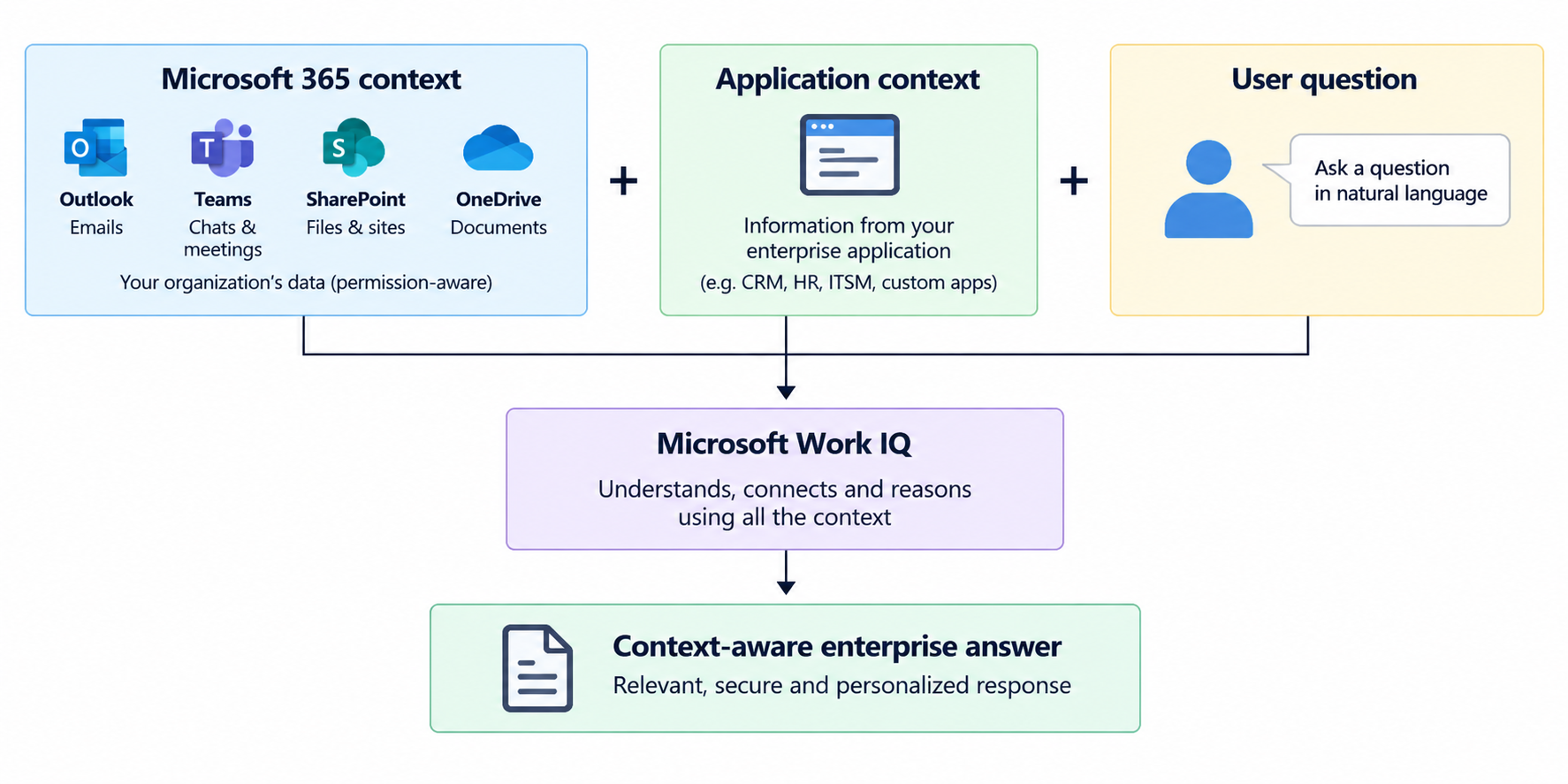
Adding Application Context
An internal application may have context not stored in Microsoft 365:
| Configuration | Value |
|---|---|
| Customer Priority | Critical |
| Escalation Level | P1 |
| Region | Europe |
| Contract Renewal | 30 days |
Pass it as additional context:
{
  "message": {
    "text": "Considering the project information and customer priority, summarize what management should focus on."
  },
  "additionalContext": [
    {
      "text": "Customer priority is Critical. Current escalation level is P1."
    }
  ],
  "locationHint": {
    "timeZone": "Asia/Kolkata"
  }
}
This enables:
Controlling Web Search
For internal-only questions, web grounding can be disabled for a turn:
{
  "message": {
    "text": "Summarize the current status of Project Phoenix."
  },
  "locationHint": {
    "timeZone": "Asia/Kolkata"
  },
  "contextualResources": {
    "webContext": {
      "isWebEnabled": false
    }
  }
}
This can be useful for questions such as:
What has our company decided?
What did our project team discuss?
What customer concerns have we received?
What does our internal policy say?
Streaming Responses
Work IQ provides a streaming endpoint:
POST https://workiq.svc.cloud.microsoft/rest/conversations/{conversationId}/chatOverStream
The response uses Server-Sent Events.
Conceptual JavaScript:
const response = await fetch(url, {
    method: "POST",
    headers: {
        "Authorization": `Bearer ${accessToken}`,
        "Content-Type": "application/json"
    },
    body: JSON.stringify(body)
});

const reader = response.body.getReader();
const decoder = new TextDecoder();

while (true) {
    const { done, value } = await reader.read();

    if (done)
        break;

    const chunk = decoder.decode(value);
    console.log(chunk);
}
Turning Work IQ into an Agent Service
A production application can expose its own API:
POST /api/enterprise-agent/ask
Example request:
{
  "conversationId": "0d110e7e-2b7e-4270-a899-fd2af6fde333",
  "question": "Summarize Project Phoenix risks."
}
Express endpoint:
app.post(
    "/api/enterprise-agent/ask",
    async (req, res) => {
        try {
            const {
                conversationId,
                question
            } = req.body;

            const accessToken =
                await getWorkIQToken(req);

            const result =
                await askWorkIQ(
                    accessToken,
                    conversationId,
                    question
                );

            res.json(result);
        }
        catch (error) {
            console.error(error);

            res.status(500).json({
                error: "Unable to process the request."
            });
        }
    }
);
Adding Agent Instructions
The application can apply business-specific instructions.
function buildEnterprisePrompt(question) {
    return `
You are an enterprise project intelligence assistant.

Analyze relevant organizational information.

Focus on:
- Decisions
- Risks
- Dependencies
- Customer concerns
- Actions
- Deadlines

Do not invent missing information.

User question:
${question}
`;
}
Then:
const prompt =
    buildEnterprisePrompt(
        "What is happening with Project Phoenix?"
    );

const result =
    await askWorkIQ(
        accessToken,
        conversation.id,
        prompt
    );
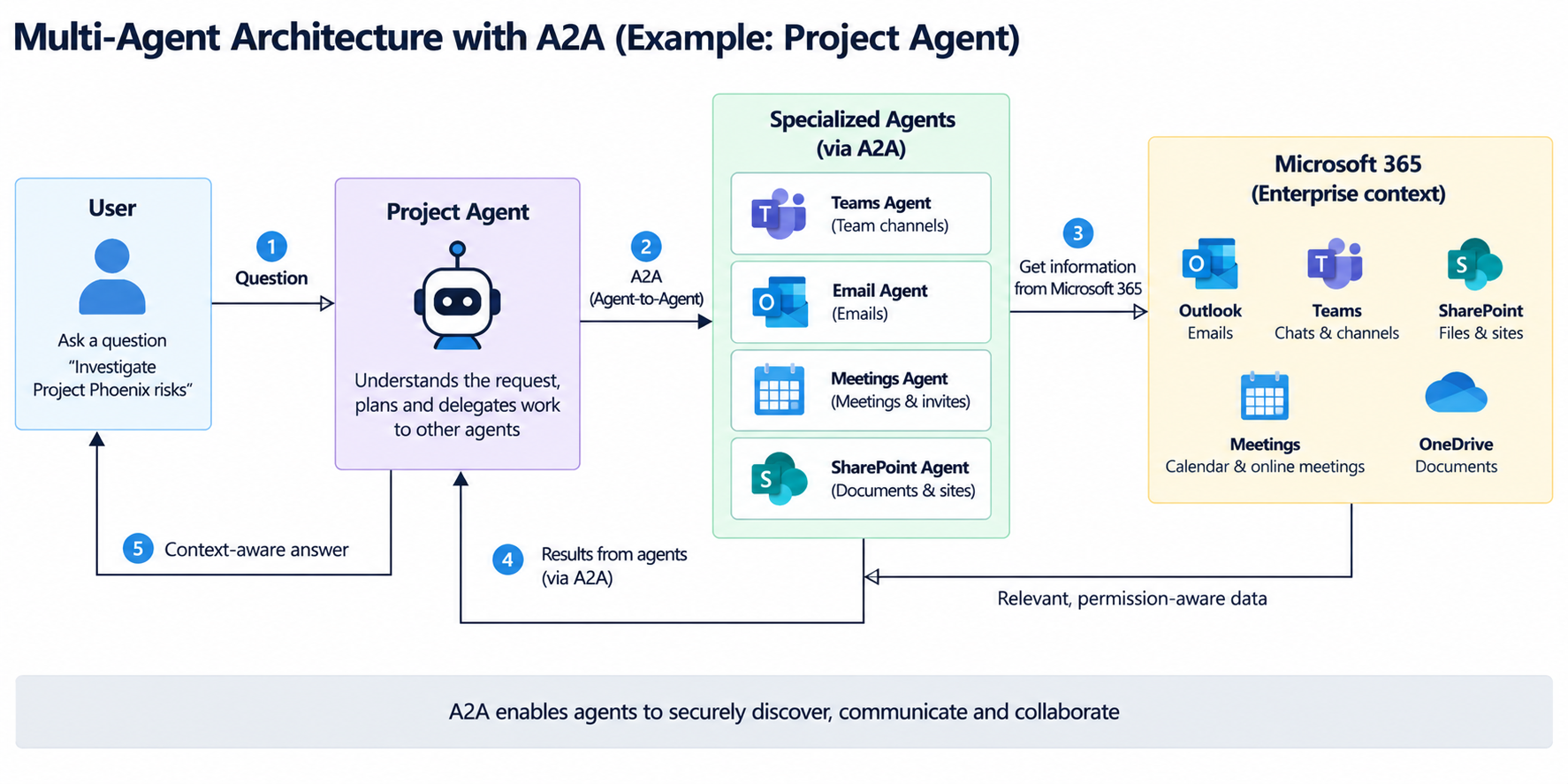
Building a Multi-Agent Architecture with A2A
A2A allows specialized agents to delegate workplace research to Work IQ.
Example endpoint:
https://workiq.svc.cloud.microsoft/a2a/
Example request:
POST https://workiq.svc.cloud.microsoft/a2a/

Authorization: Bearer ACCESS_TOKEN
Content-Type: application/json
A2A-Version: 1.0
{
  "jsonrpc": "2.0",
  "id": "request-001",
  "method": "SendMessage",
  "params": {
    "message": {
      "role": "ROLE_USER",
      "messageId": "message-001",
      "parts": [
        {
          "text": "Summarize the latest information about Project Phoenix."
        }
      ],
      "metadata": {
        "Location": {
          "timeZoneOffset": 330,
          "timeZone": "Asia/Kolkata"
        }
      }
    }
  }
}
Multi-Turn Conversations with A2A
A2A can maintain conversation continuity using a context ID.
{
  "jsonrpc": "2.0",
  "id": "request-002",
  "method": "SendMessage",
  "params": {
    "message": {
      "role": "ROLE_USER",
      "messageId": "message-002",
      "contextId": "ctx-1",
      "parts": [
        {
          "text": "Which of those risks require management attention?"
        }
      ]
    }
  }
}
Using Work IQ through MCP
MCP allows an AI runtime to use Work IQ as a tool.
             Enterprise Agent
                    |
              Agent Reasoning
                    |
           "I need work context"
                    |
                    ↓
                Work IQ MCP
                    |
       +------------+------------+
       |            |            |
      Mail        Teams        Files
       |            |            |
       +------------+------------+
                    |
              Microsoft 365
A conceptual local MCP configuration:
{
  "workiq": {
    "type": "stdio",
    "command": "workiq",
    "args": [
      "mcp"
    ]
  }
}
Follow the current Microsoft documentation for the exact MCP tool surface because it can evolve.
Combining Work IQ with Your Own Agent
Work IQ can be one intelligence capability within a broader enterprise agent.
                   User
                    |
                    ↓
              Custom Agent
                    |
         +----------+----------+
         |          |          |
      Work IQ    CRM API    SQL Database
         |          |          |
 Microsoft 365   Dynamics    Business DB
         |
         ↓
        LLM
         |
         ↓
     Final Answer
For example, to prepare for a customer review, the agent could combine Work IQ context with CRM opportunities, support incidents, and ERP information.
23. Example: Meeting Preparation Agent
Prompt:
Prepare me for my 2 PM Contoso meeting.
The agent can use Work IQ to understand the meeting, participants, recent email, Teams discussions, relevant documents, and previous meeting decisions.
A response could include:
Contoso Quarterly Review

Time:
2:00 PM

Participants:
...

Meeting Objective:
...

Recent Customer Discussions:
...

Open Issues:
...

Previous Commitments:
...

Relevant Documents:
...

Topics You Should Be Ready to Discuss:
...
24. Example: Project Intelligence Agent
Prompt:
Give me the current state of Project Phoenix.
Potential output:
Project Phoenix

Overall Status
Migration activities are progressing.

Recent Decisions
1. Pilot migration moved to October.
2. Authentication design approved.
3. Legacy workflow redesign required.

Major Risks
1. Identity dependency.
2. Customer testing delay.
3. Legacy customization remediation.

Recent Customer Concerns
...

Upcoming Meetings
...

Actions Assigned to Me
...

Important Documents
...
25. Example: Customer Intelligence Agent
Useful prompts include:
What has happened with Contoso during the last month?
What concerns has Contoso raised recently?
What commitments have we made to Contoso?
Prepare a briefing for my meeting with Contoso tomorrow.
The agent could combine Work IQ with CRM information to create a consolidated customer brief.
26. Security Model
Work IQ uses delegated Microsoft Entra ID authentication:
User
 ↓
Signs in
 ↓
Application
 ↓
Delegated token
 ↓
Work IQ
 ↓
Microsoft 365
The request executes in the signed-in user’s context. Microsoft 365 permissions and governance remain important to the security model.
27. Application-Only Authentication
Work IQ currently requires delegated user context for the scenarios described here.
Design around:
Signed-in Employee
       ↓
Delegated Identity
       ↓
Enterprise Agent
       ↓
Work IQ
For middle-tier applications, use the supported delegated/OBO pattern documented by Microsoft.
28. Production Architecture
                     Employee
                        |
                        ↓
                React / Web Client
                        |
                        ↓
               Microsoft Entra ID
                        |
                        ↓
                  Agent API
              Azure App Service
                        |
        +---------------+---------------+
        |               |               |
 Authentication    Conversation     Observability
        |            Management          |
        +---------------+---------------+
                        |
                        ↓
                    Work IQ
                        |
       +--------+-------+-------+--------+
       |        |       |       |        |
     Email    Teams   Files  Meetings  People
                        |
                        ↓
                Microsoft 365
External systems can also be integrated:
                        Agent API
                            |
           +----------------+----------------+
           |                |                |
        Work IQ          CRM API          ERP API
           |                |                |
     Microsoft 365      Dynamics          SAP
29. Error Handling
Production applications should handle unsuccessful requests.
if (!response.ok) {
    const errorBody =
        await response.text();

    console.error(
        "Work IQ request failed",
        response.status,
        errorBody
    );

    throw new Error(
        `Work IQ returned ${response.status}`
    );
}
Typical categories include authentication failures, permission or consent issues, throttling, temporary service errors, and timeouts.
For transient failures, implement retry with exponential backoff:
const delay =
    Math.pow(2, attempt) * 1000;

await new Promise(
    resolve =>
        setTimeout(resolve, delay)
);
Important Limitations
Work IQ should be treated primarily as an enterprise context, retrieval, reasoning, and conversation capability.
For business transactions or actions—such as sending email, updating records, or invoking specialized systems, combine it with the appropriate APIs and tools.
Work IQ
   ↓
Enterprise context
Reasoning
Retrieval
Conversation

Other APIs/tools
   ↓
Business transactions
Specialized actions
External systems
Use Cases
| Agent | Example question |
|---|---|
| Project Agent | “What happened with Project Phoenix this week?” |
| Meeting Agent | “Prepare me for tomorrow’s customer meeting.” |
| Sales Agent | “What concerns has Contoso raised recently?” |
| Executive Agent | “What major issues require my attention?” |
| Employee Assistant | “What actions are assigned to me?” |
| Knowledge Agent | “Find information about our cloud migration strategy.” |
| Engineering Agent | “Summarize recent discussions about API performance.” |
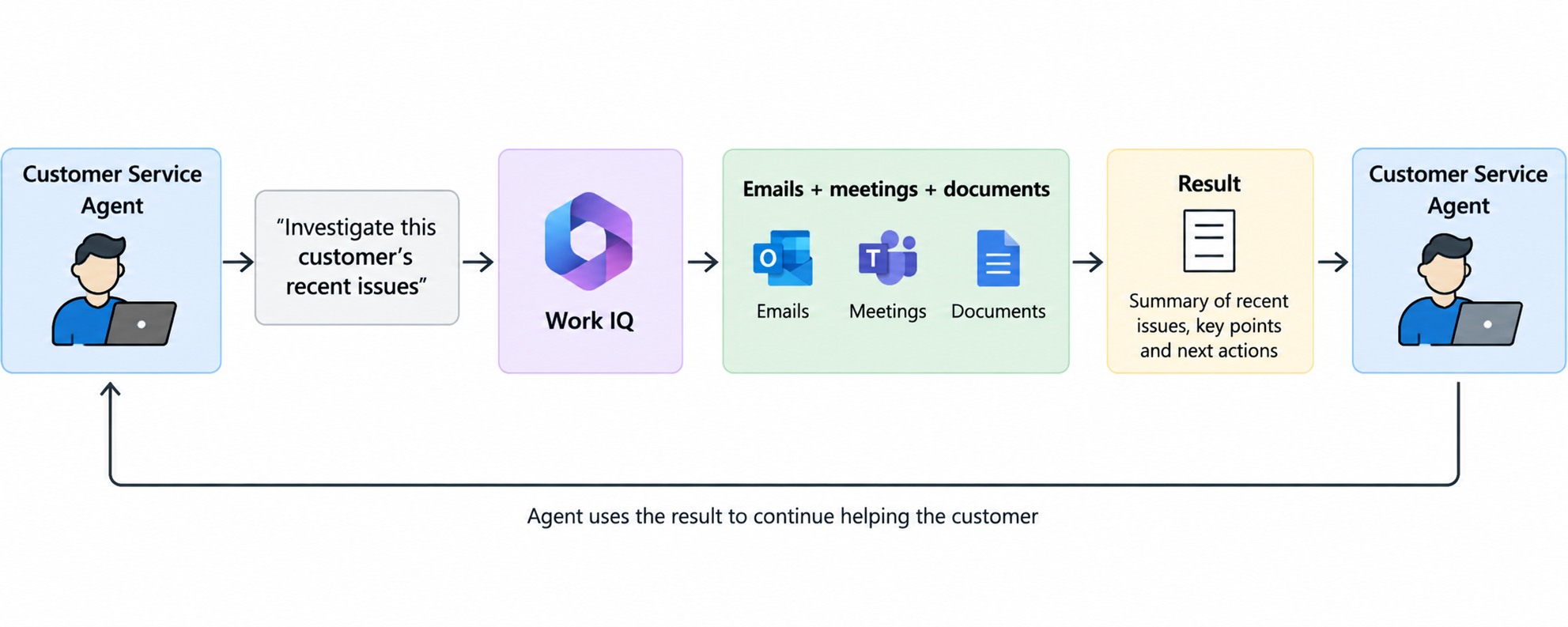
| Support Agent | “What do we know about this customer’s recurring problem?” |
| HR Agent | “Find the documents I need for onboarding.” |
| Compliance Agent | “Summarize relevant internal policy information.” |
The strongest scenarios are generally those where useful information is distributed across several Microsoft 365 workloads.
Work IQ vs. Traditional Microsoft Graph Development
Microsoft Graph is excellent when you know the object you need:
Get this email.
List these meetings.
Download this file.
Get this user.
Read this Teams message.
Work IQ is designed for questions that require broader enterprise reasoning:
What happened with Project Phoenix?
What should I know before my meeting?
What concerns has the customer raised?
What decisions were made recently?
A useful mental model:
Microsoft Graph
      ↓
Access enterprise objects

Work IQ
      ↓
Understand enterprise work
Many sophisticated enterprise agents can use both.
Work IQ as the Enterprise Intelligence Layer
A traditional agent might require many individual integration and retrieval components:
Agent
 |
 +-- Outlook connector
 +-- Teams connector
 +-- SharePoint connector
 +-- OneDrive connector
 +-- Calendar connector
 +-- Search service
 +-- Vector database
 +-- Embedding model
 +-- Permission service
 +-- Retrieval engine
 +-- Orchestrator
For suitable Microsoft 365-grounded scenarios, Work IQ can simplify the architecture:
Agent
 |
 +-- Work IQ
 |
 +-- Specialized business APIs
Recommended Development Approach
Start with a narrow, valuable scenario such as an Enterprise Project Intelligence Agent.
Initial prompts:
Summarize Project Phoenix.
What happened with Project Phoenix this week?
What are the major open risks?
What decisions were made recently?
What actions are assigned to me?
What meetings do I have related to the project?
Prepare me for the next Project Phoenix meeting.
Start with:
Web application
      ↓
Entra authentication
      ↓
Backend API
      ↓
Work IQ REST
Then progressively add streaming, document grounding, application context, external APIs, MCP tools, A2A delegation, and multi-agent orchestration.
Final Architecture
                       USERS
                         |
                         ↓
                Enterprise Agent
                         |
              Agent Orchestration
                         |
       +-----------------+-----------------+
       |                 |                 |
      A2A               REST              MCP
       |                 |                 |
       +-----------------+-----------------+
                         |
                      Work IQ
                         |
       +---------+-------+-------+---------+
       |         |       |       |         |
     Email     Teams   Meetings Files    People
                         |
                     Planner
                         |
                         ↓
                   Microsoft 365


              Enterprise Agent
                     |
        +------------+------------+
        |            |            |
       CRM           ERP      Custom APIs
        |            |            |
     Dynamics       SAP       Internal Apps
The result is not merely a chatbot. It is an enterprise agent capable of understanding the user’s workplace context while participating in a broader agent and application architecture.
Summary
Microsoft Work IQ represents an important change in how developers can build AI solutions around Microsoft 365. Instead of extracting Microsoft 365 information into separate AI infrastructure, developers can use Work IQ as a workplace intelligence layer that understands enterprise context while preserving Microsoft 365 security and governance.
The three important integration models are:
REST
Application → Work IQ

A2A
Agent → Work IQ Agent

MCP
AI Assistant → Work IQ Tools
This provides a foundation for project agents, meeting assistants, customer intelligence agents, employee assistants, engineering agents, and larger multi-agent enterprise systems.
A simplified architectural comparison is:
Traditional approach

Microsoft 365
     ↓
Extract
     ↓
Index
     ↓
Vector DB
     ↓
Custom RAG
     ↓
Agent


Work IQ approach

Microsoft 365
     ↓
Work IQ
     ↓
Agent
Leave a comment