

Build Event-Driven AI Agents with Routines in Microsoft Foundry
Introduction
AI agents are often introduced as conversational experiences. A user opens a chat, asks a question, and the agent responds. That interaction model is useful, but it represents only one way an agent can work.
In many enterprise scenarios, an agent should not wait for a person to manually start a conversation. It should be able to act when a business event occurs, when a scheduled time is reached, or when a recurring activity needs to be performed. For example, an organization may want an agent to review operational data every morning, check project readiness before a milestone, react when a new event arrives from a supported system, or continue monitoring a long-running process after some delay.
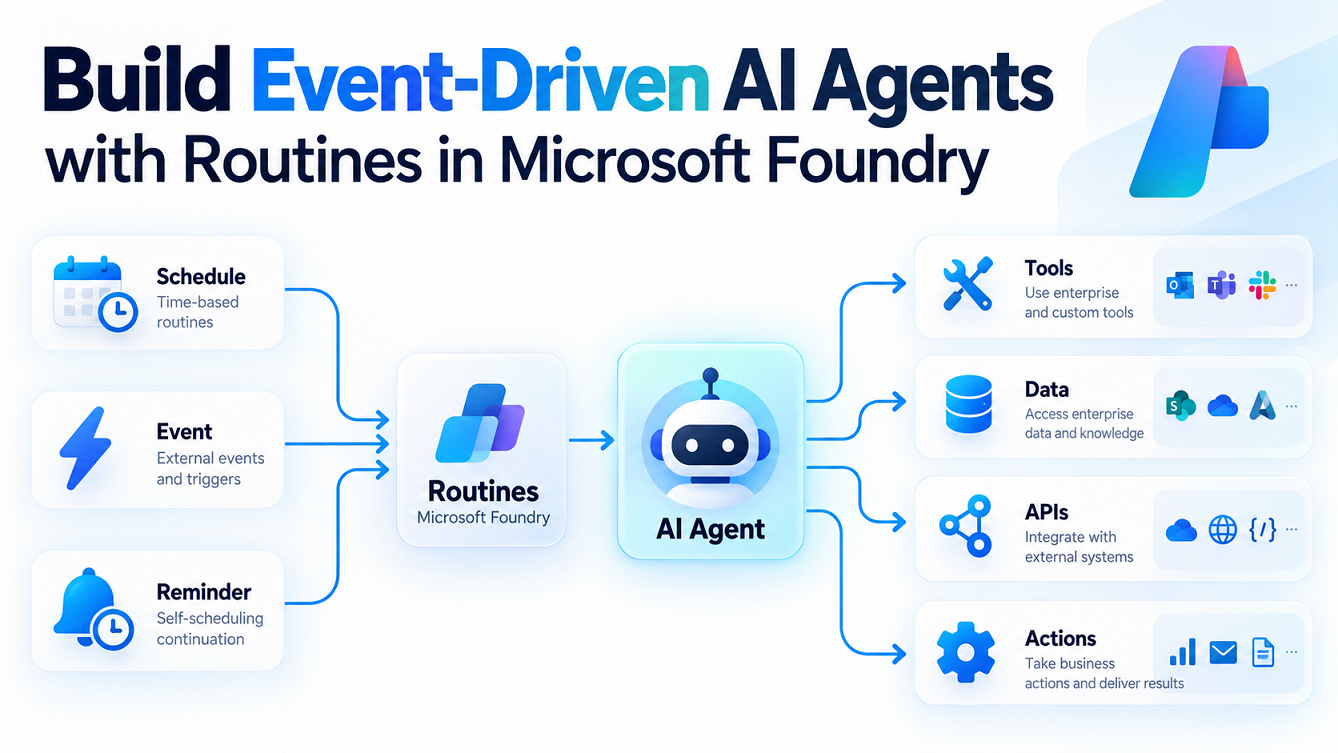
Microsoft Foundry Routines are designed for this type of automation. A Routine connects a trigger with an AI agent, allowing the agent to execute automatically without requiring a user to open a chat window first.
In simple terms, a Routine answers one question:
When should this agent run?
This makes Routines an important building block for moving from conversational agents to event-driven and scheduled AI assistants.
What Are Routines in Microsoft Foundry?
A Routine is an automation capability in Microsoft Foundry Agent Service that invokes an agent when a defined trigger occurs. The trigger can be time-based, recurring, or based on a supported external event.
The basic pattern is simple:
Trigger
   ↓
Routine
   ↓
Agent
   ↓
Reasoning and Tools
   ↓
Business Outcome
The Routine itself does not contain the business intelligence. That responsibility remains with the agent. The Routine decides when the agent should execute, while the agent decides what work needs to be performed.
This separation is useful because it keeps the automation model easy to understand. Developers can focus on building the agent’s instructions, tools, knowledge, and permissions, while Foundry handles the triggering mechanism.
Why Event-Driven Agents Matter
Traditional AI applications are usually reactive. Nothing happens until a user sends a request. In enterprise automation, however, many processes begin with an event rather than a conversation.
A scheduled reporting process begins because a certain time has arrived. A monitoring process begins because an event occurred in another system. A project review may need to run every week. A long-running task may need to be checked again after a delay.
Without Routines, developers often need to build extra infrastructure around an agent. This can include schedulers, Azure Functions, webhooks, queues, authentication logic, retry mechanisms, and monitoring components.
The architecture may look something like this:
External Event
      ↓
Webhook or Scheduler
      ↓
Azure Function
      ↓
Queue
      ↓
Agent Invocation
      ↓
Logging and Monitoring
With Routines, much of this trigger handling can be moved into Microsoft Foundry.
The design becomes simpler:
External Event or Schedule
          ↓
     Foundry Routine
          ↓
       AI Agent
          ↓
    Tools and Data
This does not mean that every automation can be reduced to a Routine. Complex integration scenarios may still need services such as Azure Functions, Logic Apps, Event Grid, or Service Bus. However, when the requirement is essentially “when this happens, run this agent,” a Routine can significantly simplify the solution.
Types of Triggers Supported by Routines
Routines support different trigger patterns depending on how an agent needs to be activated.
A one-time timer can be used when an agent should run at a specific future time. For example, an organization may schedule an agent to perform a readiness review before a planned release or project milestone.
A recurring schedule can be used when an agent needs to execute repeatedly. This is suitable for daily summaries, weekly reviews, periodic governance checks, or regular operational analysis.
Routines can also react to supported external events. This allows the agent to move from scheduled automation to true event-driven behavior, where execution begins because something changed in another system.
The trigger can therefore be thought of as the starting point of an automated AI process.
Understanding the Routine Execution Model
When a trigger occurs, Microsoft Foundry queues the Routine execution and invokes the configured agent.
The high-level flow is:
Trigger Occurs
      ↓
Routine Starts
      ↓
Agent Is Invoked
      ↓
Agent Receives Input
      ↓
Agent Reasons Over the Request
      ↓
Agent Calls Tools If Required
      ↓
Result Is Generated
      ↓
Execution Is Recorded
This execution model is important because an agent may need access to additional tools or enterprise systems before it can complete the task.
For example, the agent might need to query an API, search enterprise data, invoke an MCP tool, or perform an action through a configured connection. The Routine starts the process, but the actual business work is performed by the agent and its tools.
Creating a Routine from the Microsoft Foundry UI
One of the advantages of Routines is that developers do not have to start with code. A Routine can be configured directly from the Microsoft Foundry portal.
The first step is to open the required Microsoft Foundry project. The agent that will be invoked should already exist in the project and should be tested independently before automation is added.
Inside the project, open the Routines section and select the option to create a new Routine.
You first provide a meaningful name for the Routine. The name should describe the automation rather than the underlying technology. For example, a Routine responsible for a daily operational review could be named daily-operations-review.
Next, select the agent that should run when the Routine is triggered. This is important because the Routine does not create the agent logic itself. It simply invokes an existing Foundry agent.
After selecting the agent, provide the input or instruction that the agent should receive when the Routine runs. This input should explain the purpose of the execution clearly.
For example:
Review the latest operational data and identify any items that require immediate attention. Summarize the findings and provide recommended next actions.
The next step is to configure the trigger.
For a scheduled Routine, select whether the execution should happen once or repeatedly. If it is a recurring schedule, define the frequency and time. If the Routine is event-driven, select the supported event source and configure the connection details required by that event provider.
Once the configuration is complete, create and enable the Routine.
The overall portal process can be summarized as:
Microsoft Foundry
      ↓
Project
      ↓
Routines
      ↓
New Routine
      ↓
Select Agent
      ↓
Define Input
      ↓
Configure Trigger
      ↓
Review Configuration
      ↓
Create and Start
After creation, the Routine can be managed from the same area in the portal.
Creating a Scheduled Routine from the UI
A scheduled Routine is the easiest way to understand how the feature works.
Suppose an organization has created an agent that reviews project delivery status. Instead of asking a project manager to run the agent manually every morning, the agent can be scheduled.
In the Foundry project, open Routines and create a new Routine. Select the project-status agent and provide an instruction such as:
Review the latest project delivery information.
Highlight delays, risks, dependencies, and actions requiring attention.
Choose a recurring schedule as the trigger and define when it should run. If the organization wants the analysis every weekday morning, configure the appropriate recurrence and time.
After saving and enabling the Routine, Foundry invokes the agent automatically according to the schedule.
The resulting architecture is straightforward:
Scheduled Time
      ↓
Foundry Routine
      ↓
Project Status Agent
      ↓
Connected Data and Tools
      ↓
Project Review Result
This approach is much simpler than running an external scheduling service solely for the purpose of invoking the agent.
Configuring an Event-Driven Routine from the UI
Event-driven Routines follow the same general model, but the trigger comes from a supported external system rather than a clock.
From the Routines area, create a new Routine and select the agent that should process the incoming event.
When configuring the trigger, select the supported event provider. Foundry may require an existing project connection to the external system.
The connection is important because it defines how Microsoft Foundry is authorized to receive or work with events from that system.
After the connection is selected, configure the available event-specific properties. These properties depend on the event provider.
The resulting architecture looks like this:
External System
      ↓
Supported Event
      ↓
Foundry Connection
      ↓
Routine
      ↓
Agent
      ↓
Reasoning and Tools
When the configured event occurs, Foundry passes the relevant event payload to the agent.
The agent can then interpret the incoming data and perform the appropriate action based on its instructions.
Building a Routine Programmatically
Although the portal is useful for setup and testing, production implementations often need automation through source control and deployment pipelines.
Routines can be created programmatically using the Microsoft Foundry SDK.
First, install the required packages:
pip install "azure-ai-projects>=2.4.0" azure-identity
Then create an AIProjectClient:
import os

from azure.identity import DefaultAzureCredential
from azure.ai.projects import AIProjectClient

project_client = AIProjectClient(
    endpoint=os.environ["PROJECT_ENDPOINT"],
    credential=DefaultAzureCredential()
)
A recurring Routine can then be created using the routines API.
routine = project_client.beta.routines.create_or_update(
    routine_name="daily-operations-review",
    description="Runs the operations agent every weekday morning.",
    enabled=True,
    triggers={
        "weekday-schedule": {
            "type": "schedule",
            "cron_expression": "0 8 * * 1-5",
            "time_zone": "Asia/Kolkata"
        }
    },
    action={
        "type": "invoke_agent_responses_api",
        "agent_name": "operations-agent",
        "input": (
            "Review the latest operational information. "
            "Identify risks, exceptions, and recommended actions."
        )
    }
)
The trigger tells Foundry when the agent should execute, while the action identifies the agent and the instruction that should be passed to it.
For enterprise deployments, this programmatic approach is useful because the Routine definition can be versioned alongside the rest of the application.
Understanding Time Zones
Time zones are especially important for scheduled Routines.
A cron expression by itself does not communicate the business context of a schedule unless the correct time zone is also defined.
For example, the following schedule:
0 8 * * 1-5
means 8:00 AM on weekdays, but that time needs to be interpreted within a time zone.
A production Routine should therefore specify the intended time zone explicitly where supported.
For example:
"time_zone": "Asia/Kolkata"
This avoids unexpected execution times when solutions are deployed across regions.
Testing Routines from the Foundry Portal
A newly created Routine should be tested before relying on the actual trigger.
From the Routine details page, use the available test or run option to start an execution manually.
Testing allows you to validate the complete chain:
Routine
   ↓
Agent Invocation
   ↓
Agent Instructions
   ↓
Tool Calls
   ↓
Output
This is especially useful because a problem may exist at several different layers.
The trigger might be configured incorrectly, the agent may not have access to a required tool, authentication may fail, or the agent instructions may produce an unexpected response.
Testing the Routine independently makes troubleshooting easier.
Monitoring Routine Runs
Once a Routine begins executing automatically, observability becomes essential.
The Routine run history in Microsoft Foundry allows developers to inspect previous executions and determine whether the agent was invoked successfully.
This is important because event-driven agents often operate without someone watching them in real time.
A typical troubleshooting process is:
Did the trigger occur?
      ↓
Did the Routine start?
      ↓
Was the agent invoked?
      ↓
Did the agent receive the expected input?
      ↓
Did all tool calls succeed?
      ↓
Was a valid output produced?
Agent tracing can provide deeper visibility into reasoning steps and tool interactions, depending on the configured monitoring capabilities.
This makes Routines more appropriate for production automation than simply invoking an agent through an unmanaged script.
Pausing and Resuming a Routine
There may be times when an automation needs to be stopped temporarily without deleting its configuration.
For example, the agent may need to be paused during maintenance, a migration, a deployment window, or an incident investigation.
The Routine can be disabled and later re-enabled from the Foundry portal.
The same operation can be performed using the SDK.
project_client.beta.routines.disable(
    "daily-operations-review"
)
To enable it again:
project_client.beta.routines.enable(
    "daily-operations-review"
)
This allows operational teams to control automated agent execution without having to recreate the Routine.
Routines and Agent Identity
One of the most important design considerations for automated agents is identity.
A conversational agent often runs while a user is actively interacting with it. A Routine, however, may execute when no user is present.
The solution therefore needs to determine whose permissions the agent should use.
By default, a Routine can execute using the agent’s identity.
Conceptually:
Routine
   ↓
Agent Identity
   ↓
Permitted Resources
This model works well for service-style automation where the agent has its own managed identity or service permissions.
Some scenarios may instead require delegated permissions associated with the person who created the Routine.
Conceptually:
Routine
   ↓
Creator Identity
   ↓
Delegated Access
Choosing the correct model depends on the tools the agent uses and the systems it needs to access.
This decision should be part of the architecture rather than treated as an implementation detail.
Routines and the Reminder Tool
Routines determine when an agent should start because of an external trigger or predefined schedule.
The Reminder tool solves a different problem.
Sometimes an agent begins a process but cannot finish immediately. It may need to wait for another system to complete a long-running activity and then continue later.
In this case, the agent may need to schedule its own next execution.
The pattern becomes:
Routine Starts Agent
       ↓
Agent Starts Work
       ↓
Long-Running Operation Begins
       ↓
Agent Creates Reminder
       ↓
Delay
       ↓
Agent Runs Again
       ↓
Checks Status
The key difference is that the Routine schedule is created by the developer, while a Reminder is created dynamically by the agent.
This allows a hosted agent to behave more like an autonomous worker that can pause and resume its own activity.
Configuring the Reminder Tool from the Foundry UI
The Reminder capability is added to a hosted agent through a Toolbox.
From the Microsoft Foundry project, open the Build and customize area and navigate to Toolboxes.
Create a Toolbox or open an existing one. Add a built-in tool and select the Reminder tool where available.
Once the Reminder tool is available to the hosted agent, update the agent instructions so it understands when the tool should be used.
For example, the instructions might tell the agent that if a background process is still running, it should create a reminder and check again later.
The architecture becomes:
Hosted Agent
     ↓
Starts External Operation
     ↓
Checks Status
     ↓
Not Complete
     ↓
Reminder Tool
     ↓
Delayed Reinvocation
     ↓
Agent Continues
This model reduces the need for custom polling services.
Routines Versus Workflows
Routines and workflows are related, but they solve different problems.
A Routine focuses on triggering an agent.
A workflow focuses on coordinating multiple steps.
A Routine is appropriate for a design such as:
Scheduled Time
      ↓
Routine
      ↓
Agent
A workflow is more appropriate for something like:
Request
   ↓
Analysis Agent
   ↓
Decision
   ↓
Approval
   ↓
Second Agent
   ↓
Final Action
The easiest distinction is:
Routine = when should the agent run?
Workflow = what sequence of activities should run?
Keeping this distinction clear helps prevent overengineering.
If the business requirement is simply “when this event happens, invoke this agent,” a Routine may be enough.
If the solution needs multiple agents, branching conditions, approvals, or complex state management, a workflow or another orchestration approach is usually more appropriate.
Use Cases
A common use case for Routines is scheduled operational analysis. An organization can configure an agent to review operational data every morning, identify exceptions, and prepare an action-oriented summary before employees begin their day.
Another useful scenario is periodic governance or compliance review. Instead of relying on someone to manually start an assessment each week, the Routine can invoke the relevant governance agent automatically according to a schedule.
Routines can also support event-driven development or support scenarios. When an event is received from a supported source, the agent can analyze it immediately, classify it, and determine an appropriate next action.
Project and release management are also suitable candidates. An agent can be scheduled to perform readiness checks before important milestones and highlight unresolved risks before a planned release.
The Reminder tool extends these use cases to long-running processes. An agent may start a background operation, schedule a follow-up, and continue monitoring until the process completes.
Security and Governance Considerations
Because Routines allow agents to operate without a user manually starting every execution, their permissions should be carefully controlled.
Use managed identity where possible and avoid placing secrets such as API keys, passwords, or connection strings directly inside prompts or Routine input.
The agent should receive only the permissions required to complete its task.
It is also important to distinguish between the identity used for an external event connection and the identity the agent uses when accessing downstream resources.
These may be separate security contexts.
Production implementations should therefore document:
What triggers the Routine
Who is authorized to receive the trigger
Which identity invokes downstream tools
What data the agent can access
What actions the agent can perform
How executions are audited
Run history and agent tracing should also be included in operational monitoring.
Limitations to Consider
Routines are intentionally designed as lightweight automation rather than full orchestration.
A Routine generally represents a simple relationship between a trigger and an agent action.
For more complex processes involving multiple branches, approvals, or multiple agents, a workflow-oriented architecture may be more appropriate.
The set of supported event triggers is also more limited than a general-purpose integration platform. If the required external system is not directly supported, developers may still need Azure integration services to translate or forward the event.
The Reminder tool should also be evaluated separately because it applies to hosted-agent scenarios and may have different availability and support considerations.
Regional availability and service limitations should always be verified against the latest Microsoft documentation before implementing a production solution.
Reference Architecture
A useful way to think about an enterprise solution is to separate it into layers.
Trigger Layer
Schedule / Timer / Supported Event
              ↓
Automation Layer
Foundry Routine
              ↓
Agent Layer
Prompt Agent / Hosted Agent
              ↓
Capability Layer
Tools / APIs / MCP / Enterprise Data
              ↓
Operations Layer
Run History / Tracing / Identity / Monitoring
This architecture keeps responsibility clear.
The trigger determines when work begins. The Routine activates the agent. The agent performs the reasoning. Tools provide access to external capabilities. Monitoring and governance ensure that the automated process remains controlled.
Summary
Microsoft Foundry Routines allow AI agents to move beyond the traditional chat-based model.
Instead of waiting for a user to manually ask for help, an agent can run automatically when a scheduled time arrives or when a supported external event occurs.
The basic model is simple:
Trigger
   ↓
Routine
   ↓
Agent
   ↓
Tools and Data
   ↓
Business Outcome
For developers, the most important advantage is that the trigger infrastructure becomes part of Microsoft Foundry rather than something that must always be built separately.
The Microsoft Foundry UI also makes the feature accessible without requiring code. Developers can create a Routine, select an agent, configure the trigger, test it, review run history, and pause or resume it directly from the portal.
For production environments, the same functionality can be automated through SDKs and deployment pipelines.
Routines are best suited to scenarios where the requirement is simple: when something happens, run an agent.
When more advanced orchestration is needed, workflows remain the better choice. When an agent needs to schedule its own continuation, the Reminder tool provides another useful capability.
Together, these features make it possible to build AI agents that do more than answer questions. They can begin work automatically, react to events, and continue operating as part of a larger business process.

Leave a comment