

Copilot Cowork: From AI Assistant to AI Teammate in Microsoft 365
Introduction
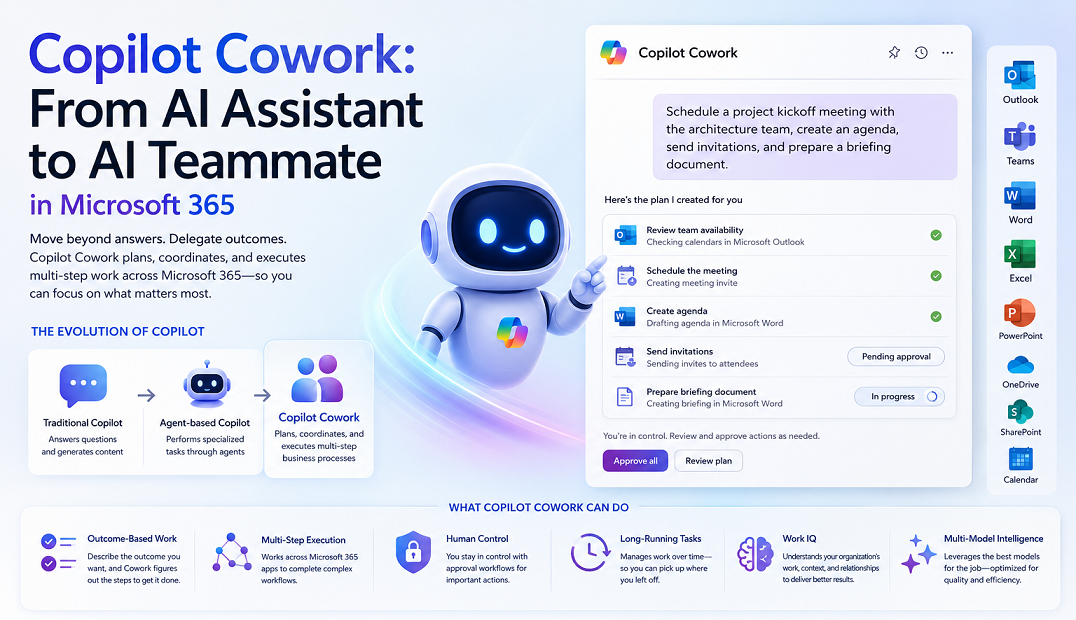
Microsoft has taken a major step in the evolution of workplace AI with Copilot Cowork, an agentic experience built into Microsoft 365 Copilot. Unlike traditional AI assistants that respond to prompts and generate content, Copilot Cowork can plan, coordinate, and execute work across Microsoft 365 applications on your behalf while keeping users in control through approval workflows.
What is Copilot Cowork?
Copilot Cowork is an AI-powered execution layer within Microsoft 365 Copilot. Users describe an outcome they want to achieve, and Cowork determines the necessary steps, gathers context, coordinates activities, and performs actions across Microsoft 365 applications such as Outlook, Teams, Word, Excel, and Calendar.
Instead of asking:
Draft an email
You can ask:
Schedule a project kickoff meeting with the architecture team, create an agenda, send invitations, and prepare a briefing document.
Cowork can handle the entire workflow while requesting approval before executing important actions.
The Evolution of Copilot
| Stage | Capability |
|---|---|
| Traditional Copilot | Answers questions and generates content |
| Agent-based Copilot | Performs specialized tasks through agents |
| Copilot Cowork | Plans, coordinates, and executes multi-step business processes |
Key Capabilities of Copilot Cowork
1. Outcome-Based Work
Users specify the desired result rather than individual steps. Cowork determines the sequence of actions needed to achieve the objective.
2. Multi-Step Task Execution
Cowork can perform complex workflows involving multiple Microsoft 365 services, including emails, meetings, documents, and collaboration.
3. Human Approval and Control
Before executing important actions such as sending emails, scheduling meetings, or modifying documents, Cowork requests approval from the user.
4. Long-Running Tasks
Cowork supports work that continues over time, such as project coordination, monthly reviews, and ongoing research activities.
5. Deep Microsoft 365 Integration
Cowork operates across Outlook, Teams, Word, Excel, PowerPoint, OneDrive, SharePoint, and Calendar.
Work IQ: The Intelligence Behind Cowork
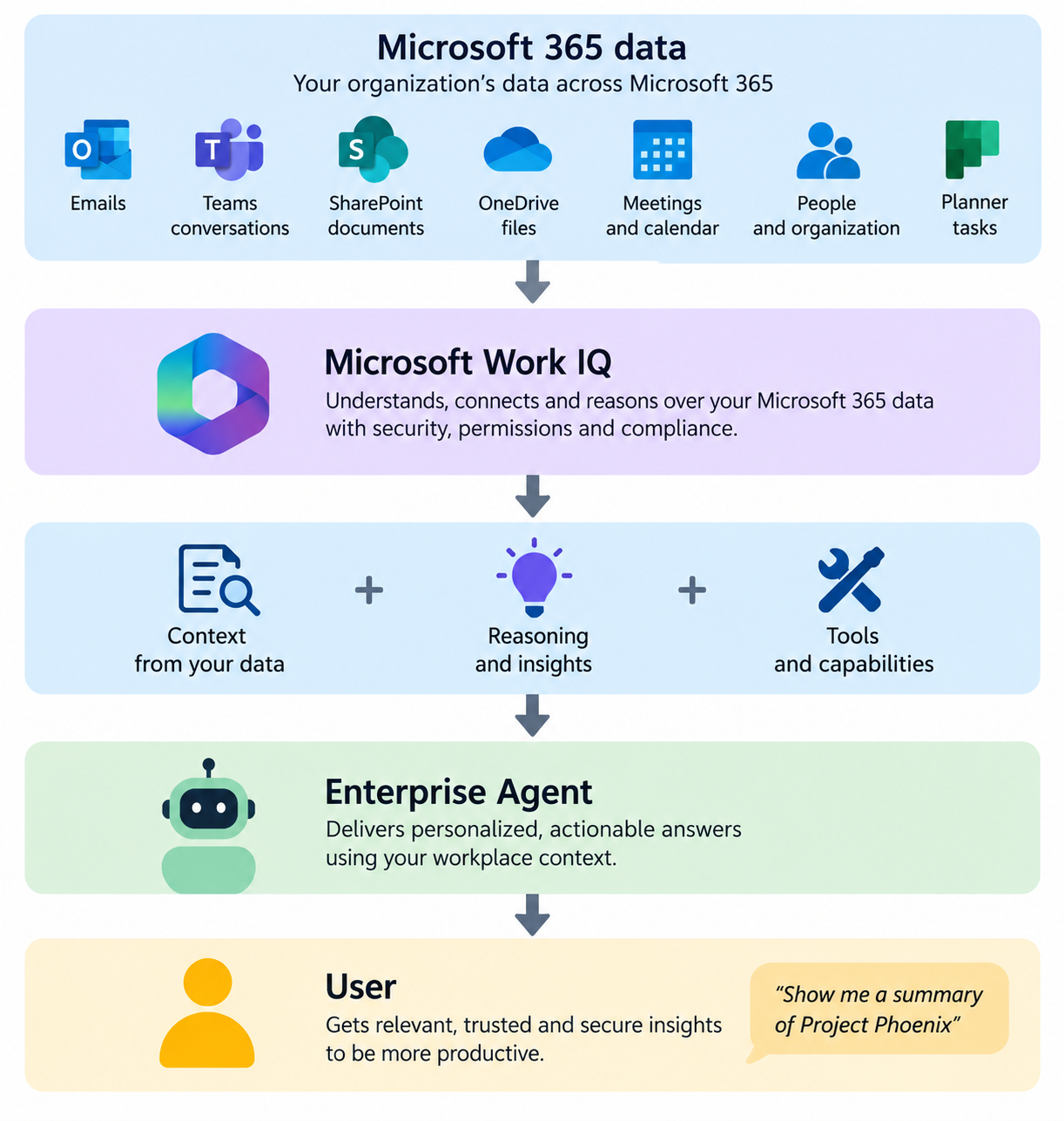
Work IQ enables AI to understand relationships across emails, meetings, chats, documents, projects, and organizational knowledge, helping Cowork reason over business context rather than isolated information.
Multi-Model Intelligence
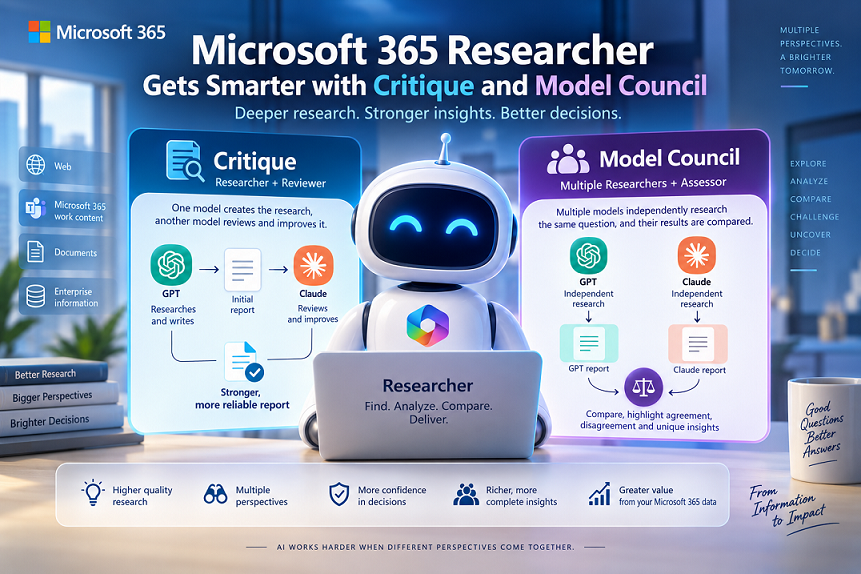
Copilot Cowork leverages multiple AI models optimized for different tasks, providing better reasoning, improved research quality, cost optimization, and task-specific model selection.
Built-In Skills
Communication Skills
- Drafting emails
- Following up with stakeholders
- Creating summaries
- Coordinating responses
Calendar Skills
- Scheduling meetings
- Finding availability
- Managing appointments
- Preparing agendas
Document Skills
- Creating reports
- Generating proposals
- Producing project documentation
- Organizing content
Research Skills
- Collecting information
- Summarizing findings
- Preparing executive briefings
- Gathering project insights
Real-World Use Cases
Executive Assistant
Review calendars, schedule meetings, prepare briefs, send follow-ups, and organize action items.
Project Management
Create project plans, coordinate meetings, track actions, share updates, and prepare communications.
Sales Preparation
Research customers, review interactions, gather documents, and build briefing packages.
Employee Onboarding
Schedule welcome meetings, create documentation, coordinate training, and track milestones.
Getting Started
- Open Microsoft 365 Copilot.
- Select Cowork.
- Describe the outcome you want to achieve.
- Review the proposed plan.
- Approve actions as needed.
- Monitor progress and results.
Governance and Security
Copilot Cowork operates within existing Microsoft 365 security boundaries, leveraging Microsoft Entra, Microsoft Purview, DLP policies, and existing access controls.
General Availability Highlights
- Broader tenant availability
- New AI model options
- Enhanced image generation capabilities
- Improved execution experiences
- Expanded skills and workflow support
- Better Microsoft 365 integration
Conclusion
Copilot Cowork represents Microsoft’s vision of the next generation of AI-powered productivity. By combining multi-model intelligence, Work IQ, Microsoft 365 integration, and governed automation, Cowork transforms AI from an assistant into a true digital coworker capable of delivering business outcomes.
Copilot helped you create work. Copilot Cowork helps you complete work.
Leave a comment