
Run AI Agents Effortlessly with Microsoft Foundry Hosted Agents
Introduction
When you build AI agents using open-source frameworks, you usually have to handle a long list of infrastructure chores yourself - containerizing the app, setting up a web server, wiring in security, persisting memory, scaling, telemetry, and rollbacks. These tasks get even harder when you are running across multiple cloud environments.
Hosted Agents in Microsoft Foundry’s Agent Service solve this problem. They let you bring your own agent code (written in LangGraph, Microsoft Agent Framework, or custom code) and run it as a managed, containerized service on Microsoft-managed, pay-as-you-go infrastructure.
In simple words: You write the agent logic, Foundry handles the plumbing.
Note: Hosted Agents are currently in preview.
Key Concepts
1. Hosted Agent
A hosted agent is a containerized agentic AI application that runs on Foundry Agent Service. Unlike prompt-based agents (which you configure through instructions), hosted agents are built entirely through code and deployed as container images.
They follow a standard lifecycle: Create → Start → Update → Stop → Delete.
2. Hosting Adapter
The hosting adapter is a framework abstraction layer that exposes your agent (or custom code) as an HTTP service. It gives you:
- Simplified local testing - run your agent locally on localhost:8088 before deploying.
- Automatic protocol translation - handles conversion between Foundry request/response format and your framework’s native data structures.
- Built-in observability - exports traces, metrics, and logs through OpenTelemetry.
- Seamless Foundry integration - works with the Foundry Responses API, conversation management, and auth flows.
Public adapter packages:
- Python:
azure-ai-agentserver-core,azure-ai-agentserver-agentframework,azure-ai-agentserver-langgraph - .NET:
Azure.AI.AgentServer.Core,Azure.AI.AgentServer.AgentFramework
3. Agent Identity
- Unpublished agents run under the project managed identity (shared across unpublished agents in the project).
- Published agents get their own dedicated agent identity. After publishing, re-grant permissions to any Azure resources the agent accesses - permissions don’t transfer automatically.
4. Managed Service Capabilities
Agent Service handles:
- Provisioning and autoscaling
- Conversation orchestration and state management
- Identity management
- Integration with Foundry tools and models
- Built-in observability and evaluation
- Enterprise-grade security, compliance, and governance
Framework and Language Support
| Framework | Python | C# |
|---|---|---|
| Microsoft Agent Framework | Yes | Yes |
| LangGraph | Yes | No |
| Custom code | Yes | Yes |
Agent Replica Sizes
You can pick CPU and memory pairs for each replica (an agent can run multiple replicas). Supported sizes range from 0.25 vCPU / 0.5 GiB up to 4.0 vCPU / 8.0 GiB, in 0.25 vCPU / 0.5 GiB steps.
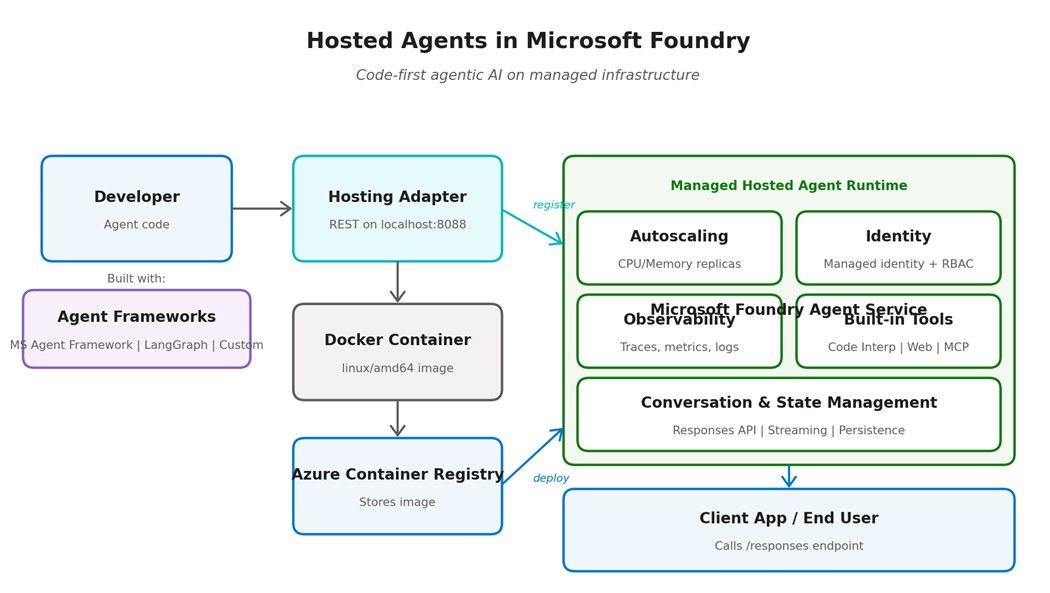
How It Works: End-to-End Flow
- Write your agent using Microsoft Agent Framework, LangGraph, or custom code.
- Wrap it with the hosting adapter so it exposes a REST API.
- Test locally on http://localhost:8088/responses.
- Containerize the agent using a Dockerfile (must target linux/amd64).
- Push the image to Azure Container Registry (ACR).
- Register the agent with Foundry (via Azure Developer CLI or Python SDK).
- Foundry deploys it as a managed container, autoscaled and secured.
- Monitor, update, or stop the agent through its lifecycle.
Local Testing Before Deployment
Before you hand the agent to Foundry, the hosting adapter lets you validate behavior on your own machine. When you run your agent locally, the adapter starts a web server on localhost port 8088 and exposes your agent as a REST endpoint. You can then send sample inputs and inspect responses using any HTTP client, exactly as Foundry will call it in production.
Local testing lets you:
- Validate agent behavior and tool calls before containerization.
- Debug issues in your development environment with familiar tools.
- Try different input scenarios quickly and iterate on instructions.
- Verify API compatibility with the Foundry Responses API.
Deploying a Hosted Agent
Prerequisites
- A Microsoft Foundry project.
- Python 3.10 or later for SDK-based development.
- Azure CLI 2.80 or later.
- Docker Desktop for local container development.
- Familiarity with Azure Container Registry.
- Agent code built on a supported framework.
Required Permissions
| Scenario | Required Roles |
|---|---|
| Create a new Foundry project | Azure AI Owner on Foundry resource |
| Deploy to an existing project with new resources | Azure AI Owner on Foundry + Contributor on subscription |
| Deploy to a fully configured project | Reader on account + Azure AI User on project |
Deployment Paths
Foundry supports two paths to deploy a hosted agent. Both produce the same managed runtime - pick the path that fits your workflow.
Path 1 - Azure Developer CLI (fastest)
The Azure Developer CLI with the ai agent extension is the fastest way to go from code to running agent. In a single command, it provisions the required Azure resources (container registry, application insights, managed identity, RBAC), builds the container image from your source, pushes it to the registry, and registers a new agent version with Foundry. It is designed for rapid prototyping and interactive setup from a local project or a sample template.
Path 2 - Python SDK (programmatic / CI-CD)
The Azure AI Projects SDK is the right path when you need programmatic control - for CI/CD pipelines, GitOps workflows, or integrating agent deployment into a larger release process. With the SDK you explicitly build and push your container image to Azure Container Registry, grant the Foundry project’s managed identity permission to pull from that registry, ensure an account-level capability host exists with public hosting enabled, and then register a new hosted agent version with parameters for image reference, CPU, memory, tools, and environment variables.
Key Configuration Parameters
| Parameter | Description |
|---|---|
| Agent name | Unique identifier (alphanumeric with hyphens, up to 63 characters). |
| Container image | Full Azure Container Registry image URL with tag - must be built for linux/amd64. |
| CPU | vCPU allocation per replica (for example, 0.25, 1.0, 2.0, up to 4.0). |
| Memory | Memory allocation per replica (paired with CPU; for example, 2 GiB with 1 vCPU). |
| Tools | Built-in tools attached to the agent - Code Interpreter, Image Generation, Web Search, MCP connections. |
| Environment variables | Runtime configuration values such as project endpoint and model deployment name. |
Supported Built-in Tools
- Code Interpreter - executes sandboxed code at agent runtime.
- Image Generation - produces images inline during the conversation.
- Web Search - grounds responses with current information from the web.
- MCP (Model Context Protocol) connections - plug in external tool servers.
Cleanup
When you are done testing or decommissioning an agent, tear down the deployment to stop incurring charges. Both paths provide a symmetric cleanup action - the Azure Developer CLI removes all provisioned resources, while the SDK lets you delete specific agent versions programmatically.
Use Cases
| Scenario | Why Hosted Agents fit |
|---|---|
| Enterprise copilots with custom logic | Run proprietary code and private tools inside a governed environment. |
| LangGraph / Agent Framework workflows | Deploy multi-step orchestrations without managing your own Kubernetes or App Service. |
| Line-of-business automation | Agents that call internal APIs and custom functions securely. |
| Long-running / stateful conversations | Service handles conversation state and memory for you. |
| Regulated industries (finance, healthcare, gov) | Enterprise-grade security, compliance, RBAC, managed identities. |
| Agents using Foundry tools | Native access to Code Interpreter, Web Search, Image Generation, MCP servers. |
| CI/CD-deployed agent apps | Programmatic deployment through Python SDK enables GitOps-style rollout. |
| Rapid prototyping | Azure Developer CLI provisions infra, registry, identity, and RBAC in one azd up. |
Summary
Hosted Agents in Microsoft Foundry offer a code-first, managed path to production for AI agents. You write agent logic using the framework of your choice - Microsoft Agent Framework, LangGraph, or custom code - wrap it with the hosting adapter, containerize it, and hand it to Foundry. From there, Foundry handles provisioning, autoscaling, identity, observability, security, and lifecycle management.
For developers, Hosted Agents remove the operational burden of running agentic applications so you can focus on what differentiates your agent - its logic, tools, and user experience.
Leave a comment