

SharePoint File-Level Archiving Solution
Introduction
Managing storage in SharePoint Online has become a growing challenge for organizations as content continues to expand across departments, projects, and collaboration spaces. Traditionally, Microsoft provided site-level archiving, which forced IT teams to archive entire sites-even when only a portion of the content was inactive.
With the introduction of file-level archiving in Microsoft 365 Archive (Public Preview 2026), organizations now have a modern, granular, and cost-effective way to archive content based on file age while keeping active collaboration unaffected.
This article provides a detailed, practical, and customer-ready explanation of file-level archiving, including architecture, implementation approach, automation strategy, and business benefits.
The Storage Challenge: Why File-Level Archiving Matters
Organizations face:
- Rapid growth of SharePoint content
- Long-lived sites (HR, Finance, Projects)
- Mix of active and inactive files in the same library
Previously:
- Only site-level archiving was available
- Result:
- Entire site had to be archived OR
- Old files stayed in active storage
This led to:
- Increased storage costs
- Reduced performance
- Poor search and Copilot relevance
With file-level archiving:
- Archive only inactive files
- Keep active content available
- Optimize storage efficiently
As highlighted in the provided document , this capability enables precision-based storage management, which was not possible earlier.
What is File-Level Archiving?
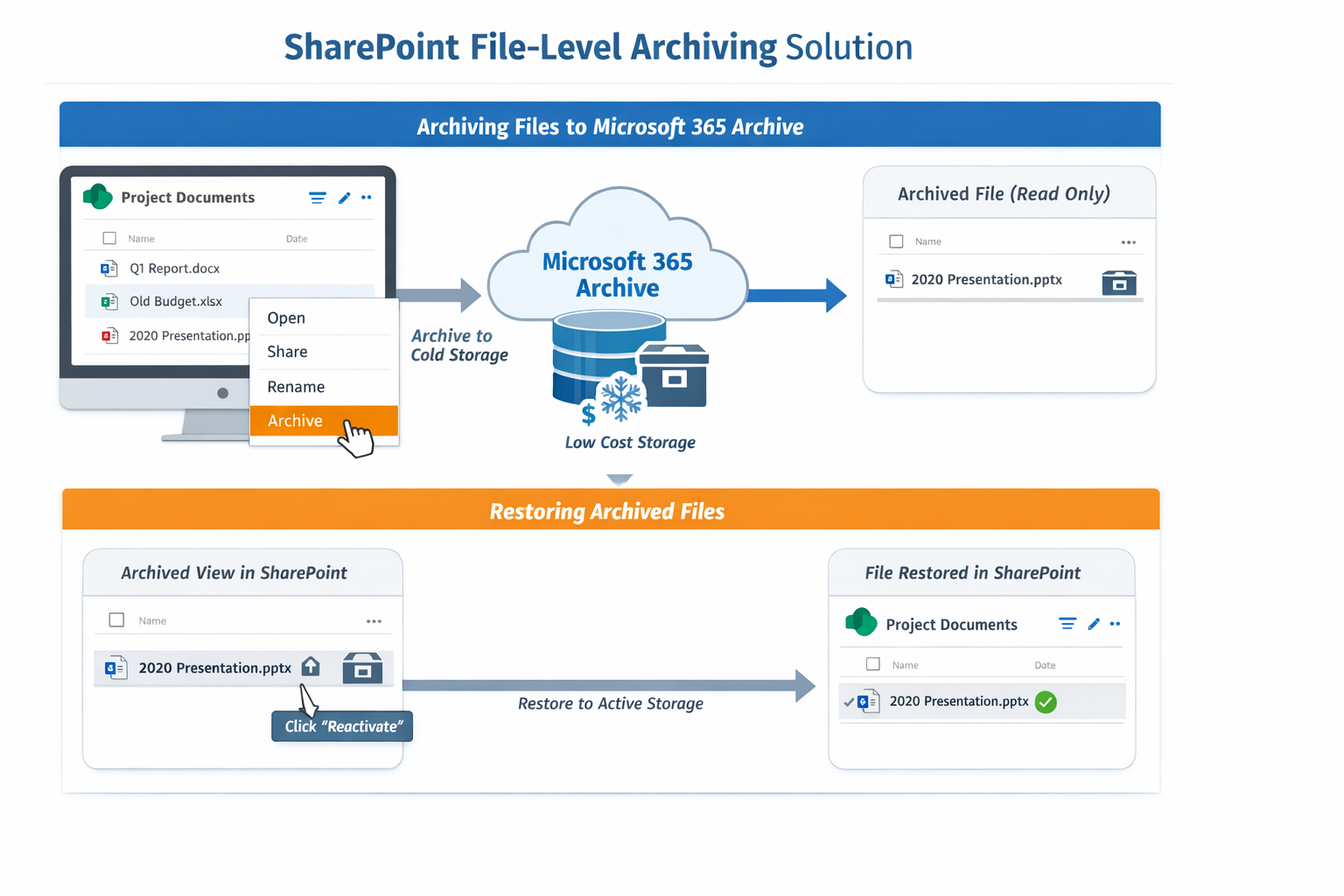
File-level archiving extends Microsoft 365 Archive from the site level to individual files, allowing files within active SharePoint sites to be moved into cold storage independently. Archived files remain visible in their original document library location with a distinct archive icon overlay, maintaining user familiarity with content structure.
While archived, files are not readable and require reactivation before access, but all metadata, permissions, and version history are fully preserved throughout the archive and reactivation cycle.
Users with edit permissions can archive files directly from SharePoint sites enabled for file archiving by selecting one or more files and choosing the archive action. The feature supports folder-level actions, enabling users to archive or reactivate all files within a folder including subfolders in a single operation, with automatic email notification upon completion.
File-level archiving allows:
- Archiving individual files or folders
- Within active SharePoint sites
- Without impacting ongoing collaboration
Key Characteristics:
- Files move to cold storage tier
- Still visible in SharePoint (with archive indicator)
- Metadata, permissions, and version history preserved
- Requires reactivation before access
This ensures:
- No data loss
- No governance impact
How File-Level Archiving Works
End-to-End Flow
- Identify inactive files (e.g., older than 3 years)
- Archive files to Microsoft 365 Archive
- Files move to cold storage
- Users can restore when needed
Addressing Customer Requirements
Requirement 1: Archive files based on age
Since automatic policies are evolving (preview stage), implement:
- Power Automate OR
- PnP PowerShell / Microsoft Graph
Example logic:
- Modified Date ≤ 3 years
This enables automated lifecycle-based archiving
Requirement 2: Easy Restore for Users
- Users with read permission can restore files
- No IT dependency
- Restore behavior:
- Recent → instant
- Older → up to 24 hours
Requirement 3: Save SharePoint Storage
- Archived files moved to low-cost storage tier
- Up to 75% cost savings compared to SharePoint storage
Storage Cost Optimization
| Storage Type | Cost | Purpose |
|---|---|---|
| SharePoint Online | Standard pricing | Active data |
| Microsoft 365 Archive | Low (~$0.05/GB) | Archived data |
Key benefit:
- Charges apply only when tenant exceeds quota
File-Level vs Site-Level Archiving
Microsoft 365 Archive now offers both file-level and site-level archiving capabilities, each serving distinct use cases for IT decision makers.
- Site-level archiving works well for project-based sites that conclude all at once, moving entire sites to cold storage when all collaboration has ended.
- File-level archiving provides the precision instrument for large, long-lived sites where a handful of active files coexist with years of inactive content, enabling selective archiving without disrupting ongoing work.
The granular control of file-level archiving allows administrators to enable users to identify and archive content they are familiar with, rather than requiring administrators to make broad judgement calls about entire site relevancy.
This approach improves both Copilot and search performance by removing archived files from the active index while maintaining governance and compliance requirements.
| Feature | File-Level | Site-Level |
|---|---|---|
| Granularity | Individual files | Entire site |
| User Control | Yes | No (Admin only) |
| Impact | Minimal | Entire site unavailable |
| Use Case | Long-lived sites | Completed projects |
File-level archiving is ideal for:
- HR portals
- Finance systems
- Ongoing collaboration sites
Automation Strategy (Recommended)
Since policy-based archiving is not fully available yet:
Option 1: PnP PowerShell (Best for Enterprise)
- Scan all sites
- Filter files older than 3 years
- Archive using API
Option 2: Power Automate
- Scheduled flow
- Condition-based filtering
- Archive action
Governance & Control
Admins can:
- Enable/disable archive per tenant/site
- Control user permissions
- Monitor archive usage
Impact on Copilot and Search
One of the most important benefits:
- Archived files removed from active index
-
Improves:
- Search results
- Copilot responses
Only relevant, active data is surfaced
Use Cases
File-level archiving directly addresses two critical customer needs:
- Easy restore functionality
- SharePoint storage savings
For storage optimization, archiving helps reduce active SharePoint storage consumption by moving inactive content to a lower-cost cold storage tier, potentially saving up to 75% compared to adding additional SharePoint storage capacity.
1. HR Department
- Archive employee records older than 5 years
- Keep current employees active
Finance
- Archive historical invoices and reports
- Maintain compliance
3. Project Sites
- Archive completed deliverables
- Keep active project files
4. Legal & Compliance
- Retain records in archive
- Restore when needed for audits
Implementation Roadmap
Phase 1: Pilot
- Enable file-level archive
- Select few sites
- Test automation
Phase 2: Scale
- Apply across tenant
- Define policies
Phase 3: Optimize
- Monitor storage savings
- Fine-tune rules
Licensing & Availability
- Available in Public Preview (March 2026)
- GA expected: July 2026
- Uses:
- Microsoft 365 Archive
- Syntex PAYG model
Key Benefits
- Up to 75% storage cost savings
- File-level precision
- Native Microsoft 365 integration
- Easy restore (self-service)
- Improved search & Copilot relevance
- No external storage dependency
Summary
File-level archiving in Microsoft 365 Archive is a game-changing capability for SharePoint storage management.
It enables organizations to:
- Archive files based on age
- Reduce storage costs significantly
- Provide seamless restore experience
- Maintain governance and compliance
While still in preview, it is recommended to:
- Start with a pilot implementation
- Build automation for age-based archiving
- Scale after General Availability
Leave a comment