

Agents in Viva Engage Community
Introduction
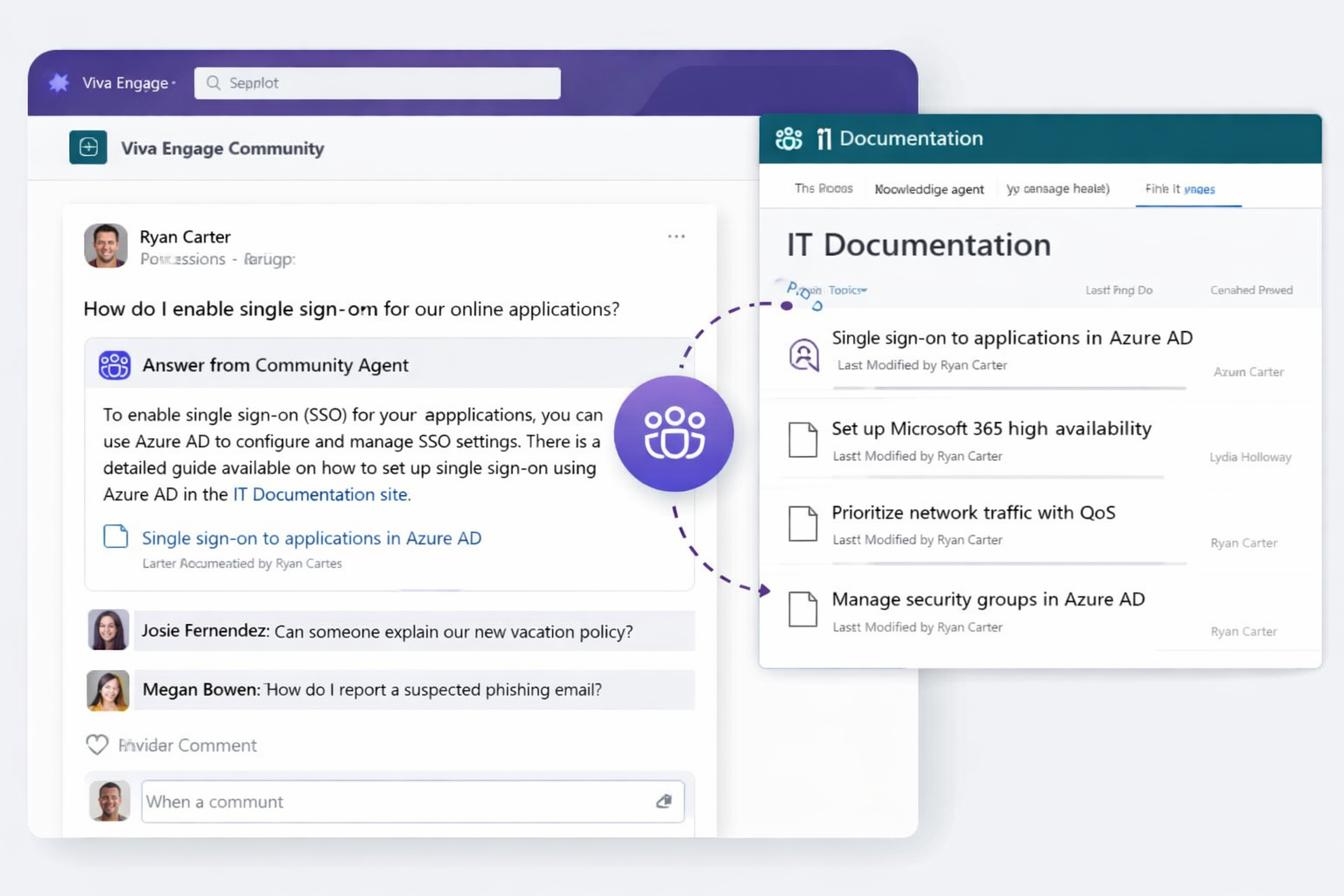
Agents in Viva Engage Community are AI-powered assistants that enhance enterprise knowledge sharing by automatically identifying unanswered questions and generating contextual, grounded responses. Built on Microsoft Copilot capabilities and integrated with Microsoft 365 data sources such as SharePoint and Viva Engage conversations, these agents act as scalable digital experts within communities.
This detailed article explains Viva Engage Community Agents in depth, including architecture, working principles, licensing, deployment configuration, governance, and real-world use cases-based on Microsoft’s official guidance.
Overview of Viva Engage Community Agents
A Viva Engage Community Agent is designed to:
- Continuously monitor community activity
- Identify unanswered questions
- Generate AI-based responses grounded in enterprise data
- Provide answers with citations
- Support human validation workflows
Unlike traditional bots, these agents are context-aware and knowledge-grounded, ensuring that responses are relevant and aligned with organizational knowledge.
Architecture and Components
The functionality of Viva Engage Community Agents is built on multiple Microsoft 365 services working together.
1. Viva Engage (Yammer) Community Layer
- Source of:
- Questions
- Conversations
- Community interactions
- Provides the engagement surface for users
2. Microsoft 365 Copilot / AI Layer
- Responsible for:
- Natural language understanding
- Answer generation
- Context synthesis
3. Knowledge Grounding Layer
- Uses:
- SharePoint Online content
- Existing Viva Engage conversations
- Ensures answers are:
- Accurate
- Contextual
- Referenced (citations included)
4. Microsoft Graph
- Handles:
- Data access
- Security trimming
- Ensures:
- Responses respect user permissions
5. Governance & Compliance Layer
- Managed via:
- Microsoft 365 Admin Center
- Viva Engage Admin settings
- Includes:
- Data protection
- Access control
- Responsible AI enforcement
How the Community Agent Works
The agent follows a structured multi-step workflow:
Step 1: Scheduled Community Scan
- Runs automatically every 15-20 minutes
- Identifies:
- Newly posted questions
- Unanswered questions
Step 2: Question Qualification
The agent filters posts based on:
- Post type = Question
- No existing:
- Best answer
- Verified answer
- Age < 14 days
This ensures the agent focuses only on relevant and actionable queries.
Step 3: Context Gathering
The agent collects context from:
- Previous Viva Engage discussions
- SharePoint documents and knowledge bases
- Organizational content accessible via Microsoft Graph
This step ensures retrieval-augmented generation (RAG).
Step 4: Answer Generation
- Uses Copilot AI models to:
- Interpret the question
- Generate a meaningful answer
- Adds:
- Citations
- References to source content
Step 5: Review and Posting
Two configurable modes:
1. Review Mode (Human-in-the-loop)
- Answer is:
- Drafted by agent
- Sent to admin/expert for approval
- Best for:
- Sensitive domains
- Regulated industries
2. Auto-Post Mode
- Answer is directly published
- Best for:
- High-volume communities
- Low-risk queries
Step 6: Continuous Learning
- Agent improves over time by:
- Using updated conversations
- Leveraging new SharePoint content
Licensing Requirements
1. Base Requirements
- Microsoft 365 tenant
- Viva Engage enabled
2. Copilot Enablement
- Community agents rely on:
- Microsoft 365 Copilot capabilities
- Licensing may include:
- Microsoft 365 Copilot license (per user)
- Or tenant-level Copilot features (depending on rollout)
3. Data Access Requirements
- SharePoint Online (for knowledge grounding)
- Microsoft Graph access
- Proper permissions configuration
4. Admin and Governance Controls
- Managed via:
- Microsoft 365 Admin Center
- Viva Engage Admin portal
Includes:
- Policy enforcement
- Access control
- Monitoring and auditing
Deployment and Configuration
Step 1: Identify Suitable Community
Choose communities that:
- Have frequent Q&A interactions
- Require faster response times
- Have available knowledge sources
Step 2: Initiate Setup
- Navigate to Viva Engage community
-
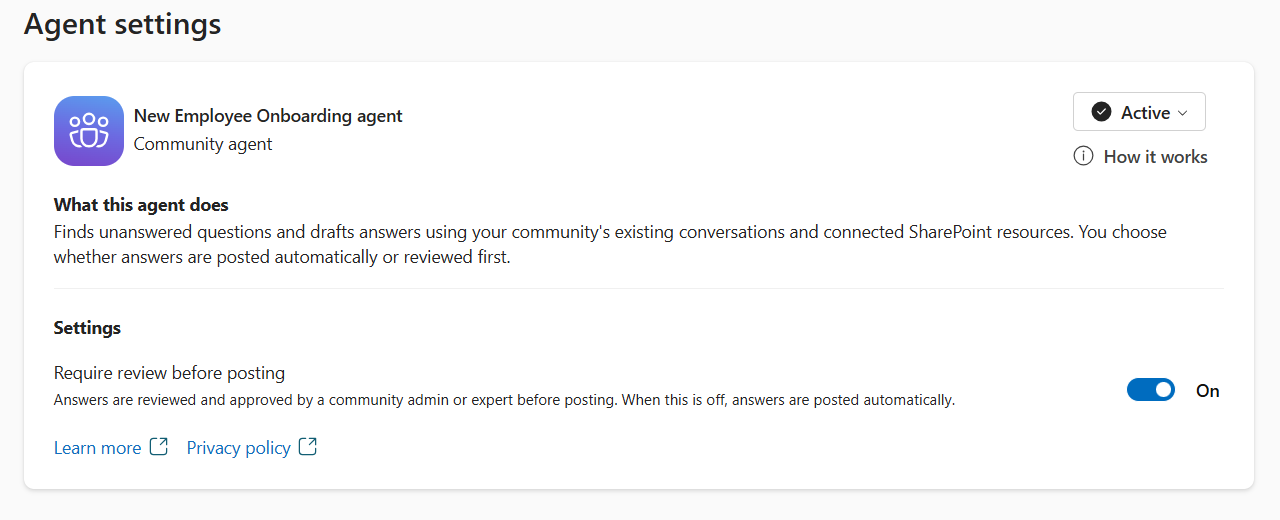
Click “Set up your community agent”
Step 3: Configure Settings
Require Review Before Posting
- ON → Responses require approval
- OFF → Automatic posting
Recommendation:
- Start with Review Mode
Step 4: Ensure Knowledge Readiness
- Validate:
- SharePoint content is structured
- Knowledge base is updated
- Ensure:
- Proper permissions
Step 5: Activate Agent
- Click “Add community agent”
- Agent begins:
- Scanning
- Responding
Step 6: Monitor and Optimize
- Review:
- Accuracy of responses
- User feedback
- Adjust:
- Review settings
- Knowledge sources
Governance and Responsible AI
1. Data Security
- Agents respect:
- Microsoft Graph permissions
- No unauthorized data exposure
2. Compliance
- Aligns with:
- Microsoft Purview policies
- Organizational compliance standards
3. Human Oversight
- Recommended:
- Use review mode initially
- Define:
- Approval workflows
4. Risk Mitigation
- Validate responses for:
- Accuracy
- Bias
- Sensitive content
Use Cases
1. IT Support Community
Scenario:
Employees ask technical questions
Agent Role:
- Provides answers using:
- Previous discussions
- SharePoint documentation
Outcome:
- Reduced support tickets
- Faster issue resolution
2. HR Knowledge Community
Scenario:
Employees ask HR-related questions
Agent Role:
- Answers policy-based queries
Outcome:
- Consistent communication
- Reduced HR workload
3. Project Communities
Scenario:
Teams collaborate on projects
Agent Role:
- Surfaces past solutions
Outcome:
- Faster decision-making
- Reduced duplication
4. Learning and Training Communities
Scenario:
Employees or students ask learning questions
Agent Role:
- Provides contextual explanations
Outcome:
- Improved learning experience
5. Enterprise Knowledge Hub
Scenario:
Large organizations with distributed knowledge
Agent Role:
- Acts as centralized knowledge assistant
Outcome:
- Scalable expertise
- Better knowledge discovery
Benefits
- Improved response time
- Reduced dependency on experts
- Increased knowledge reuse
- Better engagement in communities
- Scalable AI-driven support
Limitations
- Only supports question-type posts
- Depends on:
- Quality of knowledge sources
- May require:
- Human validation
- Not ideal for:
- Highly complex or sensitive topics without review
Best Practices
- Start with Review Mode
- Use well-structured SharePoint knowledge bases
- Train moderators and reviewers
- Monitor performance regularly
- Gradually enable automation
Summary
Viva Engage Community Agents bring AI-powered automation into enterprise collaboration by proactively answering unanswered questions using organizational knowledge. By combining Microsoft 365 Copilot, SharePoint, and Viva Engage data, these agents enable faster, more consistent, and scalable knowledge sharing.
With proper deployment, governance, and high-quality data sources, organizations can transform their communities into intelligent, self-service knowledge ecosystems.
Leave a comment