

Building AI Agent Workflows with Microsoft Foundry
Introduction
Modern AI applications often require multiple steps, multiple agents, and interactions with external systems. A single AI agent is useful for answering questions or performing simple reasoning tasks, but real-world enterprise processes are usually more complex. They involve multiple stages such as classification, validation, decision-making, execution of actions, and integration with business systems.
To handle these complex scenarios, Microsoft Foundry introduces workflows. Workflows provide a structured orchestration layer that coordinates multiple AI agents, tools, and services to perform a sequence of tasks reliably and efficiently. Instead of relying on a single agent to reason through everything, workflows allow developers to define how different agents collaborate, how decisions are made, and how tasks are executed.
Workflows in Microsoft Foundry are especially useful for building multi-agent systems, enterprise automation, and long-running AI processes where reliability, control, and transparency are important.
What are Workflows in Microsoft Foundry
A workflow in Microsoft Foundry represents a predefined sequence of steps that coordinate agents, tools, and external systems to complete a task.
Workflows allow developers to define:
- The order of execution
- The agents involved in each step
- The conditions that control decision points
- The actions or tools executed during processing
In a workflow, each step can be performed by:
- An AI agent
- A function or tool
- An external system
- A human interaction step
This structured approach ensures that AI applications behave predictably and can handle complex processes with multiple dependencies.
Unlike a single AI agent that reasons dynamically, workflows provide explicit control over execution paths, making them suitable for enterprise-grade AI applications.
Why Workflows are Important
Many AI applications require more than just generating text or answering questions. They often involve business processes that include several stages and decision points.
For example:
- A customer support system might need to classify tickets, evaluate priority, and route them to the correct team.
- A document processing system might need to extract data, validate it, and store it in a database.
- A travel assistant might need to coordinate booking flights, hotels, and transport.
Workflows help manage these scenarios by providing:
-
Structured Execution: Each step is executed in a predefined order, ensuring consistency and reliability.
-
Multi-Agent Coordination: Multiple AI agents can collaborate within a workflow to perform different roles.
-
Decision-Based Routing: Workflows can dynamically route execution paths based on conditions or AI outputs.
-
Integration with Systems: Workflows can connect AI agents with APIs, databases, and enterprise applications.
Core Components of a Workflow
Workflows in Microsoft Foundry are composed of several components that work together to manage task execution.
1. Agents
Agents are AI components responsible for reasoning, understanding prompts, and generating responses.
In workflows, agents can perform tasks such as:
- Classifying input
- Extracting information
- Generating recommendations
- Making decisions
Each agent focuses on a specific responsibility within the workflow.
2. Tasks or Steps
A workflow consists of multiple tasks, where each task performs a specific operation.
Examples include:
- Running an agent
- Calling an API
- Executing a function
- Processing data
Tasks form the building blocks of the workflow.
3. Tools and Functions
Workflows can invoke tools or external functions to perform actions such as:
- Querying a database
- Sending emails
- Updating records
- Calling external APIs
This allows workflows to interact with real-world systems.
4. Conditional Logic
Workflows support conditional branching, which enables decision-based execution.
For example:
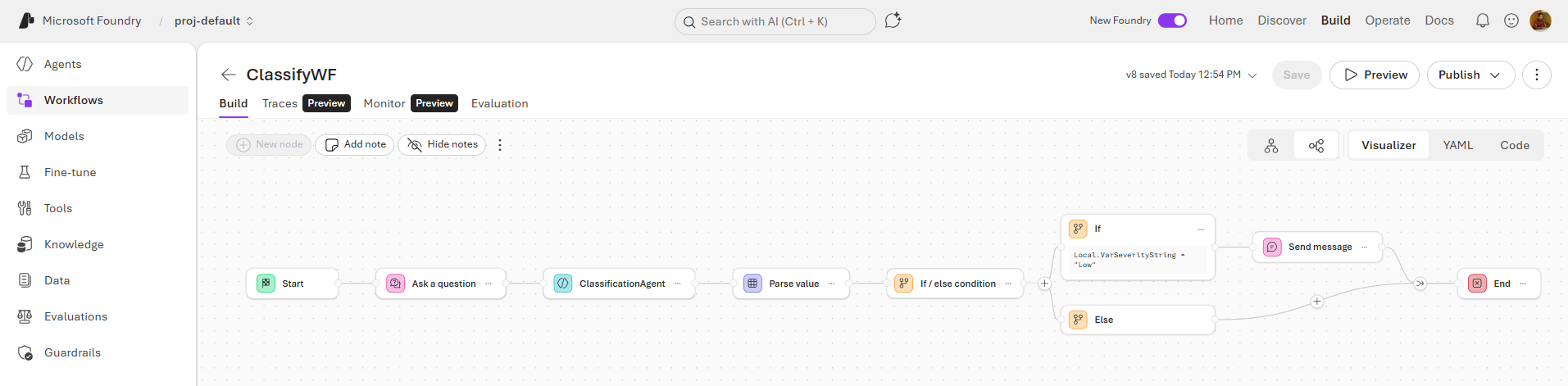
- If ticket severity is high, then escalate to priority queue
- If severity is low, then route to standard support
This allows workflows to dynamically determine the next step based on results.
5. Execution Control
Workflows provide execution control features such as:
- Sequential execution
- Parallel execution
- Conditional routing
- Error handling
These controls ensure that workflows run efficiently and reliably.
Multi-Agent Workflows in Microsoft Foundry
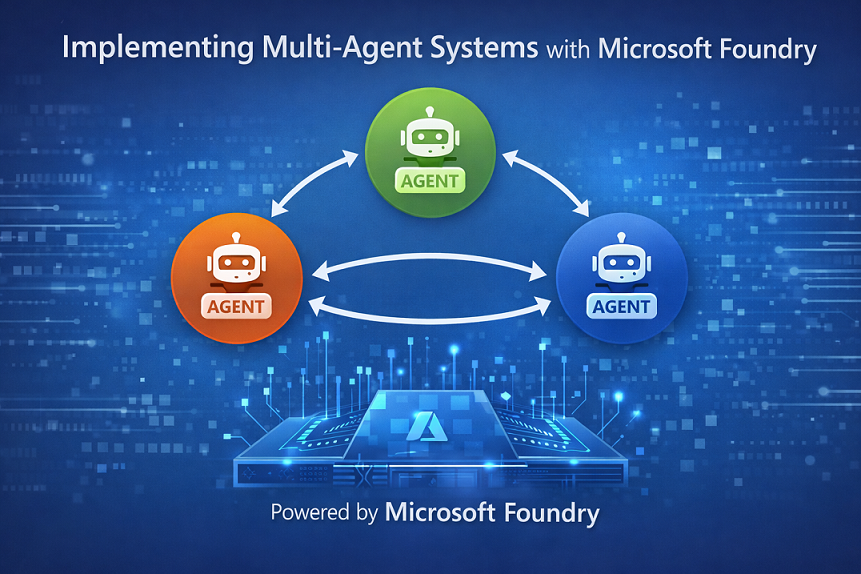
One of the powerful capabilities of Microsoft Foundry is multi-agent workflows, where multiple specialized agents collaborate to complete complex tasks.
Instead of a single AI agent performing all responsibilities, workflows divide tasks among different agents.
Example roles in a multi-agent workflow:
- Classification Agent - determines the category of a request
- Decision Agent - determines the next action
- Execution Agent - performs the final task
- Validation Agent - checks output quality
Each agent performs a specific role, improving both accuracy and reliability.
Benefits of multi-agent workflows include:
- Better task specialization
- Improved reasoning accuracy
- Modular architecture
- Easier debugging and maintenance
Workflow Execution Model
When a workflow is executed, it follows a structured execution path defined by the workflow configuration.
The execution process typically includes:
- Input received
- First task triggered
- Agent processes input
- Result evaluated
- Conditional routing applied
- Next task executed
- Final output generated
This execution model ensures that tasks are performed in the correct sequence and decisions are handled appropriately.
Creating Workflows in Microsoft Foundry
Developers can create workflows using Microsoft Foundry Agent Service by defining steps that coordinate agents and tools.
The process typically involves:
Step 1: Define the Workflow Objective
Identify the business process the workflow will automate.
Example:
Customer support ticket triage.
Step 2: Identify Agents
Determine the agents required for the process.
Example agents:
- Ticket Classification Agent
- Priority Assessment Agent
- Routing Agent
Step 3: Define Workflow Steps
Define the sequence of steps the workflow will execute.
Example:
- Receive support ticket
- Classify issue type
- Determine severity
- Route to appropriate team
Step 4: Add Conditional Logic
Define rules that determine workflow routing.
Example:
- If severity = High → Escalation queue
- If severity = Medium → Standard queue
- If severity = Low → Self-service guidance
Step 5: Integrate Tools
Add external integrations such as:
- CRM systems
- Ticketing systems
- Knowledge bases
Workflow Patterns Supported in Foundry
Microsoft Foundry workflows support several orchestration patterns used in multi-agent systems.
Sequential Pattern
Tasks execute one after another in a fixed order.
Example:
Data extraction → validation → storage.
Conditional Routing Pattern
The workflow branches based on decisions or AI outputs.
Example:
Ticket severity determines the next processing path.
Parallel Execution Pattern
Multiple tasks run simultaneously.
Example:
Running multiple data validation checks at the same time.
Human-in-the-Loop Pattern
Certain steps require human validation before continuing.
Example:
Approving financial transactions.
Example: Support Ticket Routing Workflow
A practical example of a Foundry workflow is support ticket triage.
Step 1: Ticket Input
A customer submits a support request.
Step 2: Classification Agent
The classification agent determines:
- Category (billing, technical, account)
- Product area
Step 3: Severity Assessment Agent
Another agent evaluates:
- Urgency
- Impact
- Priority
Step 4: Conditional Routing
Based on severity:
- High → Escalation team
- Medium → Support queue
- Low → Automated response
Step 5: Action Execution
The workflow creates a ticket in the helpdesk system and notifies the responsible team.
Benefits of Workflows in Microsoft Foundry
Using workflows provides several advantages when building AI-powered enterprise applications.
-
Better Control: Developers can define exact execution paths instead of relying on unpredictable agent reasoning.
-
Modular Architecture: Each agent or step can be independently updated without affecting the entire system.
-
Improved Reliability: Structured workflows reduce errors and improve process consistency.
-
Enterprise Integration: Workflows allow AI agents to integrate with existing enterprise systems.
-
Scalable AI Systems: Workflows make it easier to scale multi-agent architectures for large organizations.
Use Cases
Workflows in Microsoft Foundry can be used across many industries and business processes.
-
Customer Support Automation: Classify support tickets and route them automatically to the correct teams.
-
IT Incident Management: Analyze alerts and route them to appropriate response teams.
-
Document Processing: Extract data from documents, validate it, and store it in databases.
-
Insurance Claim Processing: Analyze claims, detect fraud risk, and route for approval.
-
Travel Planning Assistants: Coordinate multiple agents to book flights, hotels, and transportation.
Summary
Workflows in Microsoft Foundry provide a structured way to orchestrate AI agents, tools, and enterprise systems to automate complex processes. Instead of relying on a single AI agent, workflows enable multiple specialized agents to collaborate within a defined execution structure.
By supporting sequential tasks, conditional routing, parallel execution, and integrations with external systems, workflows allow developers to build reliable and scalable multi-agent applications. This approach improves control, transparency, and reliability when deploying AI solutions in enterprise environments.
As organizations adopt agent-based architectures, workflows in Microsoft Foundry play a critical role in coordinating intelligent systems and enabling the next generation of AI-driven applications.

Leave a comment