
Microsoft Foundry Local: Run AI Models On Your Device
Introduction
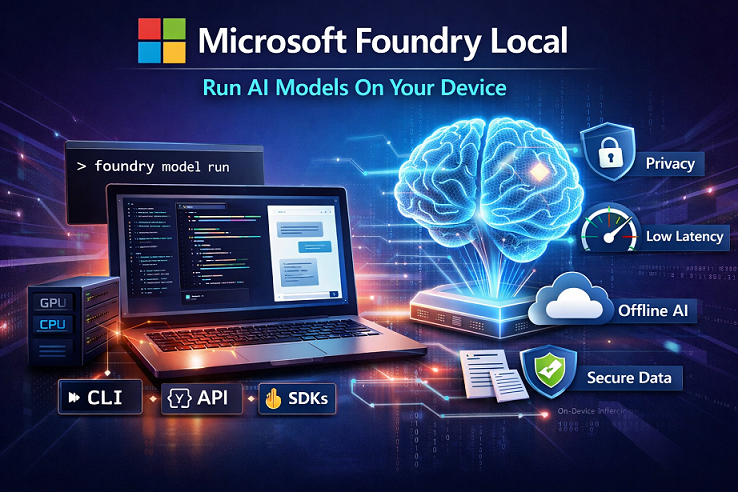
Microsoft Foundry Local is Microsoft’s way to run generative AI models directly on your own device (laptop, desktop, or server) instead of calling a cloud endpoint. You install it once, download a model once, and then you can run inference locally using a CLI, an OpenAI-compatible REST API, or SDKs (Python/JavaScript/.NET, etc.).
This is useful when you want privacy, low latency, offline capability, or you simply want to avoid recurring cloud inference cost for certain workloads.
What Foundry Local is
Foundry Local is an on-device AI inference solution that lets you run AI models locally through:
- CLI (foundry)
- REST API (OpenAI-compatible)
- SDKs (for building apps that talk to the local service)
It’s currently available as a preview feature, meaning capabilities may change and some parts can be limited compared to a production cloud service.
When Foundry Local is a fit (and when it isn’t)
Foundry Local is best for single-device or edge scenarios. For multi-user, high-throughput, or broader production workloads, Microsoft suggests moving to Microsoft Foundry (cloud).
Benefits
1) Privacy and data control
Your prompts and outputs are processed on your machine when you call a local endpoint (for example, http://localhost:PORT). This helps keep sensitive data local.
2) Lower latency
Because inference runs locally, you can often get faster responses, especially for interactive apps.
3) Cost efficiency
You reuse existing hardware and reduce (or eliminate) cloud inference costs for local workloads.
4) OpenAI-compatible integration
Foundry Local exposes an API that is compatible with OpenAI-style chat completions, which makes it easier to switch your app from cloud → local by changing the base URL.
5) Hardware-aware model variants
When you run a model by an alias (example: qwen2.5-0.5b), Foundry Local can pick the best variant for your device (GPU/NPU/CPU) and download what matches your hardware.
System requirements and prerequisites
Below are typical prerequisites for getting started:
- OS: Windows 10 (x64), Windows 11 (x64/ARM), Windows Server 2025, macOS
- Hardware: Minimum 8 GB RAM and 3 GB free disk (recommended 16 GB RAM and 15 GB disk)
- Network: Internet required for first-time model downloads; after that, cached models can run offline
Also:
- A terminal (Windows Terminal / macOS Terminal).
- Initial downloads may include execution providers optimized for your hardware.
How Foundry Local works (simple architecture)
Foundry Local typically involves these pieces:
- Foundry CLI (foundry): manages models, service, and cache
- Local service: exposes a local endpoint (OpenAI-compatible REST server)
- Model cache: where downloaded model files live on disk
- Execution providers: acceleration layers for CPU/GPU/NPU depending on your machine
Quick checks:
- foundry service status shows whether the service is running and prints the local endpoint.
- curl http://localhost:PORT/openai/status can validate that the REST service is reachable (replace PORT from foundry service status).
Installation
Windows (WinGet)
winget install Microsoft.FoundryLocal
Verify:
foundry --version
Upgrade:
winget upgrade --id Microsoft.FoundryLocal
Uninstall:
winget uninstall Microsoft.FoundryLocal
macOS (Homebrew)
brew tap microsoft/foundrylocal
brew install foundrylocal
Upgrade:
brew upgrade foundrylocal
Uninstall:
brew rm foundrylocal
brew untap microsoft/foundrylocal
brew cleanup --scrub
Manual installers (GitHub releases)
If you prefer not to use package managers, the GitHub repo provides manual installation steps and release artifacts.
How to use Foundry Local (CLI-first workflow)
1) List available models
foundry model list
This may download execution providers the first time.
2) Run a model interactively
foundry model run qwen2.5-0.5b
Then type a prompt in the terminal (example: “Why is the sky blue?”).
3) Control the local service
Common service commands include:
foundry service start
foundry service stop
foundry service restart
foundry service status
4) Manage downloads and cache
Useful model/cache commands include:
foundry model download <model>
foundry model load <model>
foundry model unload <model>

foundry cache list
foundry cache remove <model-name>
Using Foundry Local via REST API (OpenAI-compatible)
Foundry Local supports an OpenAI-compatible Chat Completions style endpoint (POST /v1/chat/completions).
Example: call chat completions with curl
- Get the endpoint/port:
foundry service status
- Send a request (replace PORT):
curl http://localhost:PORT/v1/chat/completions \
  -H "Content-Type: application/json" \
  -d '{
    "model": "qwen2.5-0.5b",
    "messages": [
      {"role": "user", "content": "Explain RAG in simple words."}
    ],
    "temperature": 0.3
  }'
Notes:
- Your model value can be an alias or a specific model id (aliases allow hardware-aware selection).
- The REST API is under active development and can have breaking changes (important for production planning).
Using Foundry Local from applications (SDK examples)
Option A: Python (OpenAI SDK + Foundry Local manager)
Microsoft’s integration guidance shows using FoundryLocalManager to start the service, load a model, and then point the OpenAI client at the local endpoint.
import openai
from foundry_local import FoundryLocalManager

alias = "qwen2.5-0.5b"
manager = FoundryLocalManager(alias)

client = openai.OpenAI(
    base_url=manager.endpoint,
    api_key=manager.api_key  # not required for local usage
)

resp = client.chat.completions.create(
    model=manager.get_model_info(alias).id,
    messages=[{"role": "user", "content": "Write a 3-line summary of Foundry Local."}]
)

print(resp.choices[0].message.content)
Option B: JavaScript / Node.js
The Learn article also provides a JavaScript flow using foundry-local-sdk and the OpenAI JS SDK pattern.
Option C: .NET (native + OpenAI-compatible patterns)
Foundry Local has a .NET-friendly path (including a NuGet SDK package) and documentation for using “native chat completions” in C# projects.
Practical use cases
1) Sensitive internal data scenarios
- HR policy Q&A, finance analysis, legal summaries
- Customer data processing where you want to reduce exposure by keeping prompts local
2) Offline / low-connectivity environments
- Field teams (manufacturing sites, remote locations)
- Secure environments where external network calls are restricted
3) Low-latency experiences
- Real-time copilots inside desktop apps
- Local assistive tools for developers, writers, analysts
4) Prototyping before cloud deployment
- Build a feature locally, validate model fit and prompts
- Later move to Microsoft Foundry (cloud) for scale and shared access
5) Local “chat UI” integrations
Microsoft provides guidance for integrating Foundry Local with tools like Open WebUI so you can have a local chat interface backed by Foundry Local models.
6) Beyond chat: audio transcription
Foundry Local also documents native audio transcription using a Whisper model in a C# console application (local inference, streaming output).
Examples you can try today
Example 1: First-run CLI demo (fastest path)
foundry model run qwen2.5-0.5b
Ask: “Give me 5 bullet points about Microsoft Copilot Studio.”
Example 2: Run a bigger model (if your hardware supports it)
foundry model run gpt-oss-20b
Microsoft notes CUDA variants can require an NVIDIA GPU with ~16 GB VRAM or more for some larger models.
Example 3: Starter projects (ready-made code)
Microsoft provides starter projects such as a chat app starter, summarize sample, and function calling example.
Limitations and considerations
1) Preview + breaking changes risk
Foundry Local is in preview, and the REST API is explicitly described as under active development with potential breaking changes. Plan accordingly if you are building something long-lived.
2) Not for distributed production hosting
Microsoft’s guidance is clear: Foundry Local is for on-device inference, not distributed/containerized/multi-machine production deployments.
3) Hardware constraints are real
Your experience depends on:
- RAM/VRAM/NPU availability
- Model size and quantization
- Drivers and execution provider availability
4) OS support
Microsoft’s “Get started” guidance lists Windows (including Server 2025) and macOS as supported OS options.
(If you develop in Linux environments like WSL2, you may need to call the Foundry Local service remotely from a supported host machine.)
5) First-time download requirement
You typically need internet access to download models and execution providers initially. After caching, you can run offline.
Best practices and troubleshooting tips
Microsoft’s troubleshooting guidance highlights common patterns:
- If inference is slow, prefer GPU acceleration and consider more quantized variants (for example INT8).
-
If the service isn’t accessible or has port binding issues, try:
foundry service restart - If installation via winget has scope/machine issues, Microsoft provides a PowerShell-based approach for all-users installation.
Summary
Foundry Local gives you a practical way to run LLMs and other AI models locally with a developer-friendly experience: CLI to manage models, a local service with OpenAI-compatible endpoints, and SDK integrations for Python/JS/.NET. It shines in privacy-first, low-latency, offline, and prototyping scenarios. The main tradeoff is that it’s a preview, it’s not meant for distributed production hosting, and model performance depends heavily on your hardware.
References
- Microsoft Learn: Get started with Foundry Local
- Microsoft Learn: What is Foundry Local?
- GitHub: microsoft/Foundry-Local
- Microsoft Learn: Foundry Local architecture
- Microsoft Learn: Integrate inference SDKs with Foundry Local
- Microsoft Learn: Best practices and troubleshooting guide for Foundry Local
- Microsoft Learn: Foundry Local CLI reference
- Microsoft Learn: Foundry Local REST API reference
Leave a comment