
Microsoft Frontier: Early Access to the Future of Work with AI Agents
Introduction
Microsoft’s Frontier program is an early-access program that lets you try the newest Copilot and agent experiences inside Microsoft 365 before they become generally available. It’s meant for organizations (and some individual subscribers) who want to learn early, experiment safely, and provide feedback that helps Microsoft shape what ships next.
At the same time, Microsoft’s 2025 Work Trend Index describes a broader shift: the rise of the “Frontier Firm”-organizations that combine people and AI agents as “digital labor” to scale capacity and close the “time and energy” gap. Frontier (the early-access program) is one practical way to start moving along that journey.
What is the Microsoft Frontier program?
Frontier is an early-access space for the latest AI innovations in Microsoft 365. It provides hands-on access to:
- Experimental agents (available via Agent Store),
- Preview features in Microsoft 365 apps (Word/Excel/PowerPoint and more),
- Other “what’s next” capabilities beyond core apps.
Microsoft positions Frontier as a way to:
- Explore new Copilot experiences before general availability,
- Learn faster with real usage,
- Share feedback using built-in tools,
- Do all of this while staying in the familiar Microsoft 365 environment.
Frontier vs. Frontier Firm (and why it matters)
These terms sound similar, but they’re different:
- Frontier program: an early-access program inside Microsoft 365 to try new Copilot/agent features early.
- Frontier Firm: a type of organization described in the Work Trend Index-built around “intelligence on tap” and human + agent hybrid teams.
Journey to the Frontier Firm
Microsoft describes three phases (not always linear; many orgs will be in multiple phases at once):
- Human with assistant
AI helps employees work better and faster by removing routine work. - Human-agent teams
Agents join teams as “digital colleagues,” doing specific tasks under human direction. - Human-led, agent-operated
Humans set direction; agents execute end-to-end workflows and processes, checking in as needed.
Microsoft also highlights why this shift is urgent: leaders see a capacity gap (productivity pressure vs. limited human time/energy), and many expect agents to be integrated into AI strategy in the next 12-18 months.
How Frontier helps: Frontier gives you a controlled way to pilot “phase 2 and 3” style agent capabilities early-so you can adapt people, process, and governance before broad rollout.
What you can explore in Frontier
Microsoft groups Frontier access into three main categories:
- Frontier agents
Experiential AI agents available in the Microsoft 365 Copilot Agent Store. - Frontier core app features
Early-access features inside Microsoft 365 apps like Word, Excel, etc. - Other Frontier capabilities
Experiences beyond agents and core apps-Microsoft highlights examples such as Agent 365, Copilot Pages, Project Opal, and Windows 365 AI-enabled Cloud PCs on the Frontier program page.
Who can use Frontier?
Enterprise & business users
If you have a Microsoft 365 Copilot license, you’re eligible to try Frontier features-subject to availability and your organization’s admin settings.
Individuals
People with Microsoft 365 Personal, Family, or Premium subscriptions can also access certain Frontier features (initially called out as web experiences like Word/Excel and Copilot chat on the web, with early availability noted for U.S.-based subscribers in English first).
Important program notes
- Frontier includes experimental capabilities, so features may change as Microsoft improves them.
- Early availability may be limited by region and language (with initial rollout noted for English/U.S. in some cases).
Key benefits of joining the Frontier program
1) Early capability access (ahead of GA)
You get to explore new Copilot and agent features earlier, which is valuable if you’re responsible for AI strategy, adoption, or governance.
2) Faster learning and readiness
Frontier is designed to “accelerate learning” and gather real-world feedback-so your teams can build internal skills and patterns before features become mainstream.
3) Influence through feedback loops
Because Frontier is experimental, Microsoft explicitly expects feedback to guide what becomes broadly available (often via built-in feedback tools).
4) Practical progress toward the “Frontier Firm” model
Work Trend Index data points to agents becoming part of company strategy soon, and Frontier helps you pilot the tools that enable human-agent teams and agent-run workflows.
5) Safer experimentation inside your Microsoft 365 environment
Microsoft frames Frontier as exploration within the security and familiarity of Microsoft 365 (while still requiring admins to control access).
How to enroll and activate Frontier (step-by-step)
Terminology note: “Enroll” often means your admin opts your tenant/users in, and then users see Frontier features where available.
A) IT admin: turn on Frontier in Microsoft 365 admin center
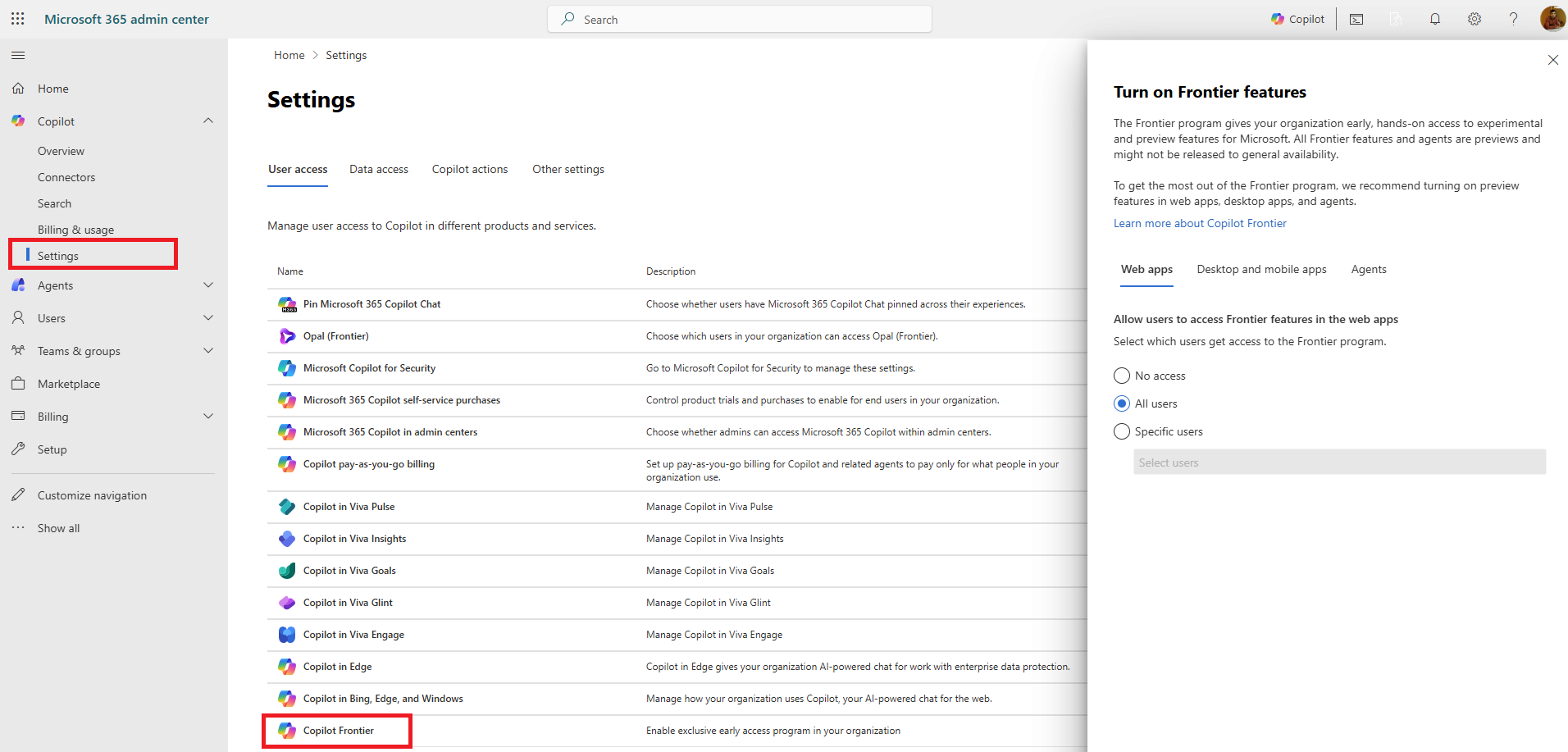
Microsoft’s “Getting started with Frontier” guide describes an admin opt-in flow in the Microsoft Admin Center, including:
Microsoft Admin Center → Copilot → Settings → User Access → Copilot Frontier → Turn on Frontier features
Admins can also manage access for web apps through the same “Copilot Frontier” area and grant access to specific users.
B) End users: find and use Frontier agents (Agent Store)
Microsoft Support describes how users can discover Frontier-labeled agents in Copilot Chat:
- Sign in at microsoft365.com
- Open Copilot Chat and go to All Agents / Agent Store
- Look for agents labeled “(Frontier)”
- Install or request access (depending on admin settings)
C) Desktop & mobile: Microsoft 365 Insider / Beta channel (where required)
The getting started guide also mentions Insider/Beta enrollment for some desktop/mobile experiences:
- Admins can add users to the Microsoft 365 Insider program (with an option like “Channel Picker” suggested).
- Users may need to switch to Beta Channel in Office apps (e.g., File → Account → Update Channel → Beta Channel) to receive some early features.
D) Special Frontier experiences may have extra prerequisites
Some “beyond core apps” offerings have additional requirements. For example, the guide lists separate eligibility for things like AI-enabled Cloud PCs and Microsoft Agent 365 (including “Modern Billing” and accepting terms).
Governance and best practices for running Frontier safely
Frontier is powerful, but it’s still an early-access program-so treat it like a controlled preview.
Recommended approach
- Start with a pilot group
Use a small, cross-functional group (IT + security + a few business teams) to evaluate value, risk, and user experience. - Use admin controls intentionally
Frontier access depends on admin settings and agent access policies; curate what’s available if you need tighter control. - Define success metrics
Tie pilots to outcomes: time saved, cycle time reduction, quality improvements, user satisfaction, reduced rework, etc. - Create a feedback rhythm
Make feedback part of the pilot process (weekly check-ins, “what worked / what didn’t,” and use built-in feedback tools). - Prepare a change/adoption plan
Frontier features may change-so keep training content lightweight and updateable (short videos, internal FAQs, “prompt patterns,” and do/don’t guidance).
Use cases
Below are practical ways organizations use Frontier capabilities to move toward the Frontier Firm model.
1) Executive and leadership: strategy acceleration
- Use Frontier Copilot experiences to draft strategic narratives, operating model changes, and “human-agent team” charters aligned to the 3-phase journey described in Work Trend Index 2025.
2) Sales: pipeline and outreach support
- Try “Frontier” agents such as Sales-focused experiences highlighted on the Frontier program page (example: Sales Development Agent is referenced as a Frontier learning item).
- Use Copilot Chat + agents to summarize customer context, prepare call briefs, and create follow-up content consistently.
3) Marketing: faster campaign execution
- Use early features like Copilot Pages (called out on the Frontier program page) to turn ideas into structured campaign plans and working assets in one place.
4) HR and People teams: employee support and insights
- Explore People-related agent experiences (Support documentation references “Person view in People Agent”).
- Common scenarios: onboarding Q&A, policy summarization, role-based help, and internal communications drafting.
5) Finance and operations: analysis and reporting
- Pilot early Excel/Word Copilot capabilities (Frontier includes early access in Microsoft 365 apps and web versions depending on eligibility).
- Use for variance explanations, narrative reporting, and faster insight generation from existing workbooks.
6) IT and security: controlled experimentation with agents
- Use admin settings to enable Frontier for selected users and manage access to agents.
- Build an internal “approved agents” list, document supported scenarios, and establish escalation paths when users see access blocks or policy prompts.
7) “Human-led, agent-operated” pilots (advanced)
To test phase 3 concepts from the Work Trend Index, pick one workflow where humans set direction and agents do the execution (with oversight). Examples:
- Incident response triage (draft, summarize, propose next steps)
- Vendor onboarding documentation
- Policy-to-procedure conversion and validation
These align directly with the “agents execute business processes and workflows, checking in as needed” description.
Common rollout pattern (a simple playbook)
- Choose 2-3 high-value scenarios (one per function: Sales, HR, IT).
- Enable Frontier for a pilot group (admin opt-in + Agent Store policy).
- Run a 2-4 week pilot with lightweight training + weekly review.
- Document what worked (prompts, templates, governance decisions).
- Scale in waves (expand access, refine policies, formalize training).
Summary
Microsoft Frontier is an early-access program inside Microsoft 365 that gives you hands-on access to experimental agents and preview Copilot features-helping you learn faster, influence product direction through feedback, and prepare your organization for broader adoption.
It also fits neatly into Microsoft’s broader “Frontier Firm” journey: moving from AI as an assistant, to human-agent teams, and ultimately to human-led, agent-operated workflows. Frontier gives you a structured, admin-controlled way to start that transition with real scenarios, not just theory.
Leave a comment