
Model Router in Microsoft Foundry: Intelligent Model Selection for Modern AI Applications
Introduction
As organizations build more AI-powered applications, one common challenge keeps appearing: which AI model should be used for which task?
Some prompts are simple and need quick answers, while others require deep reasoning, higher accuracy, or larger context windows. Using a single large model for everything often leads to high costs, while using only smaller models can reduce answer quality.
Model Router in Microsoft Foundry solves this problem.
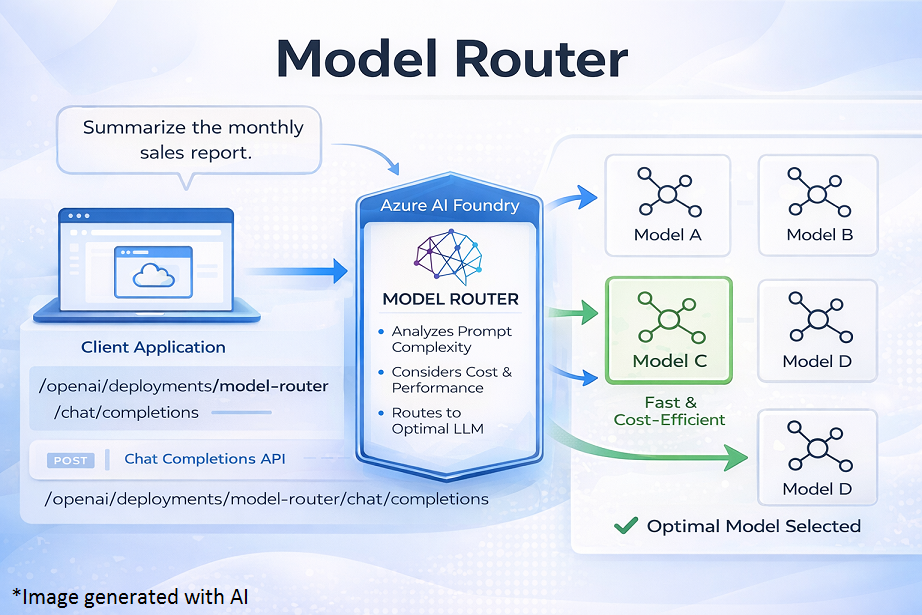
Model Router is a smart routing layer provided by Azure AI Foundry that automatically selects the most suitable underlying language model for each incoming prompt. Developers interact with one single endpoint, and Model Router takes care of deciding which model should answer which request, based on complexity, cost, and quality needs.
This approach allows teams to build scalable, cost-efficient, and high-quality AI solutions without managing multiple model endpoints or writing complex routing logic themselves.
What Is Model Router in Microsoft Foundry?
Model Router is a deployable chat model available in the Azure AI Foundry model catalog. Unlike traditional models, it does not generate responses on its own. Instead, it works as an intelligent decision engine that sits in front of multiple large language models (LLMs).
When a request is sent to the Model Router:
- It analyzes the prompt
- Determines the level of reasoning, complexity, and expected quality
- Routes the request to the most appropriate underlying model
- Returns the response back to the application
From the application’s perspective, this all happens behind the scenes.
Key Characteristics
- Single endpoint for multiple models
- Dynamic model selection per request
- Built-in cost and quality optimization
- No changes required in application logic
Why Model Router Matters
1. Cost Control at Scale
Not every prompt needs a powerful and expensive model. Model Router ensures that:
- Simple questions are answered by smaller, cheaper models
- Complex tasks are handled by advanced reasoning models
This dramatically reduces overall AI spend, especially in high-volume applications.
2. Simplified Architecture
Without Model Router, developers must:
- Deploy multiple models
- Write logic to decide which model to use
- Maintain and test routing rules
Model Router removes this complexity by acting as a central intelligence layer.
3. Consistent User Experience
Users always interact with the same chatbot or API endpoint, while the platform dynamically adjusts the intelligence level behind the scenes.
How Model Router Works
The internal workflow of Model Router can be understood in four simple steps:
- Request Received
The application sends a chat completion request to the Model Router endpoint. - Prompt Analysis
Model Router analyzes:- Prompt length
- Task type (summarization, reasoning, generation, etc.)
- Complexity and ambiguity
- Routing Decision
Based on the selected routing strategy and allowed model subset, it chooses the best underlying model. - Response Returned
The chosen model generates the response, which is sent back through the router to the application.
All of this happens in real time and is fully managed by Azure AI Foundry.
Routing Modes in Model Router
Model Router supports different routing strategies to align with business goals.
Balanced Mode (Default)
- Balances cost and quality
- Ideal for most enterprise applications
- Uses advanced models only when necessary
Cost-Optimized Mode
- Prioritizes lower-cost models
- Suitable for high-volume workloads such as:
- Internal chatbots
- FAQ systems
- Support ticket triage
Quality-Optimized Mode
- Prioritizes best possible responses
- Routes most prompts to top-tier models
- Useful for:
- Legal or compliance analysis
- Executive reporting
- Customer-facing critical responses
Supported Model Selection (Model Subsets)
Model Router allows you to define a subset of models it is allowed to route to. This is important for:
- Compliance requirements
- Performance consistency
- Cost predictability
For example:
- Exclude experimental models
- Restrict routing to models approved by security teams
- Limit to models with specific context sizes
This gives organizations governance without losing flexibility.
Implementation in Microsoft Foundry
Step 1: Deploy Model Router
- Open Azure AI Foundry
- Navigate to Model Deployments
- Select Deploy a model
- Choose model-router from the catalog
- Configure:
- Routing mode
- Allowed model subset
- Rate limits and content filters
Once deployed, you receive a standard endpoint, just like any other chat model.
Step 2: Call Model Router Using Chat Completions
Model Router uses the same Chat Completions API as other Azure OpenAI models.
This means no special SDKs or APIs are required.
Example Request (Conceptual)
{
    "messages": [
        { "role": "system", "content": "You are a helpful assistant." },
        { "role": "user", "content": "Create a summary of our quarterly sales performance." }
    ],
    "max_tokens": 300
}
The application does not specify which model to use. Model Router decides this automatically.
Step 3: Monitor and Optimize
After deployment, teams should:
- Monitor usage patterns in Azure
- Track which models are being selected most often
- Adjust routing mode or model subsets if needed
- Fine-tune prompts to avoid unnecessary complexity
Best Practices for Using Model Router
1. Start with Balanced Mode
Balanced mode works well for most scenarios and provides a strong baseline before optimization.
2. Control Prompt Complexity
Long or ambiguous prompts may push routing toward expensive models.
Always use:
- Clear instructions
- Structured prompts
- Retrieval-based approaches (RAG) where possible
3. Define Governance Early
Use model subsets to:
- Enforce compliance
- Control cost exposure
- Avoid unexpected model behavior
4. Monitor Cost and Performance Together
Do not optimize purely for cost or quality. The real value of Model Router comes from finding the right balance.
Use Cases
1. Enterprise Knowledge Assistant
Employees ask questions ranging from:
- What is our leave policy?
- Summarize compliance risks across regions.
Model Router ensures simple queries stay low-cost while complex ones get high-quality responses.
2. Customer Support Automation
- Password reset questions → smaller models
- Complex troubleshooting → advanced reasoning models
This improves response time and reduces support costs.
3. Internal Reporting and Analysis
- Routine summaries → cost-efficient models
- Strategic insights → quality-optimized models
All handled through one endpoint.
Sample Scenario
Scenario:
An HR chatbot serves 10,000 employees globally.
Without Model Router:
- Uses a single advanced model
- High monthly AI costs
- Overkill for simple questions
With Model Router:
- Simple HR FAQs routed to smaller models
- Policy analysis routed to advanced models
- Same chatbot UI
- Lower costs and better scalability
Summary
Model Router in Microsoft Foundry is a foundational capability for building modern AI applications at scale. It:
- Automatically selects the right model per request
- Reduces cost without sacrificing quality
- Simplifies architecture with a single endpoint
- Enables governance, flexibility, and scalability
For organizations adopting AI across departments, Model Router removes the complexity of model management and allows teams to focus on business value instead of infrastructure decisions.
Leave a comment